CIS Hardening of a Debian Linux Server Part 10: Level 2 Logging and Auditing
This is the eleventh entry in the series documenting the Debian 13 server CIS hardening project.
This pass covers Level 2 recommendations that were deferred in the Level 1 pass.
6.1.2 Configure rsyslog #
This section covers 6.1.2.9 through 6.1.2.11 of the benchmark. All three were flagged as Level 2 during the Level 1 pass and deferred.
6.1.2.9 Ensure rsyslog-gnutls Is Installed #
# dpkg-query -s rsyslog-gnutls &>/dev/null && echo "rsyslog-gnutls is installed"
No output, indicating the package is not present.
# apt install rsyslog-gnutls
# dpkg-query -s rsyslog-gnutls &>/dev/null && echo "rsyslog-gnutls is installed"
rsyslog-gnutls is installed
Recommendation passes.
Setting Up rsyslog Forwarding With a Log Server #
Satisfying 6.1.2.10 and 6.1.2.11 requires a certificate authority, a second machine to act as the log server, and a certificate pair for each host. A dedicated VPS was provisioned to act as the rsyslog server, built from a snapshot of the already-hardened server, and is referred to below as the server (i.e. the log server); the original machine is referred to as the client (i.e. the rsyslog client).
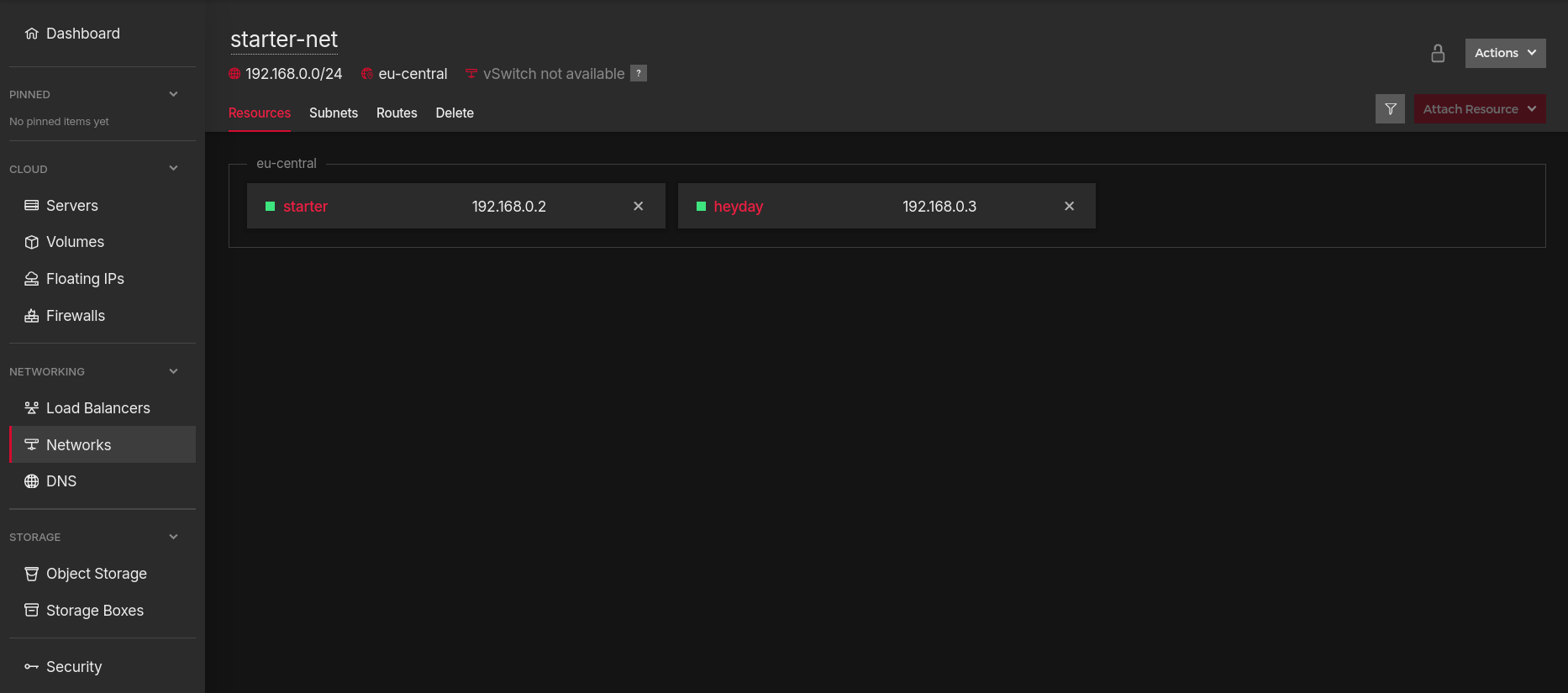
A private network (192.168.0.0/24) was created and both hosts attached to it, with the client and server each receiving a private address automatically (192.168.0.2 for the client and 192.168.0.3 for the server).
A certificate authority was generated on a separate, local machine:
$ certtool --generate-privkey --outfile ca-key.pem --bits 4096
** Note: You may use '--sec-param High' instead of '--bits 4096'
Generating a 4096 bit RSA private key...
$ ls
ca-key.pem
$ certtool --generate-self-signed --load-privkey ca-key.pem --outfile ca.pem
Generating a self signed certificate...
Please enter the details of the certificate's distinguished name. Just press enter to ignore a field.
Country name (2 chars):
State or province name:
Locality name:
Organization name:
Organizational unit name:
Common name: rsyslogCA
UID:
Enter the subject's domain component (DC):
This field should not be used in new certificates.
E-mail:
Enter the certificate's serial number in decimal (123) or hex (0xabcd)
(default is <REDACTED>)
value:


Activation/Expiration time.
The certificate will expire in (days): 3650


Extensions.
Does the certificate belong to an authority? (y/N): y
Path length constraint (decimal, -1 for no constraint):
Is this a TLS web client certificate? (y/N):
Will the certificate be used for IPsec IKE operations? (y/N):
Is this a TLS web server certificate? (y/N):
Enter a dnsName of the subject of the certificate:
Enter a URI of the subject of the certificate:
Enter the IP address of the subject of the certificate:
Enter the e-mail of the subject of the certificate:
Will the certificate be used for signing (required for TLS)? (Y/n): y
Will the certificate be used for data encryption? (y/N):
Will the certificate be used to sign OCSP requests? (y/N):
Will the certificate be used to sign code? (y/N):
Will the certificate be used for time stamping? (y/N):
Will the certificate be used for email protection? (y/N):
Will the certificate be used to sign other certificates? (Y/n): y
Will the certificate be used to sign CRLs? (y/N):
Enter the URI of the CRL distribution point:
X.509 Certificate Information:
        Version: 3
        Serial Number (hex): <REDACTED>
        Validity:
                Not Before: Sat Aug 15 09:53:58 UTC 2026
                Not After: Tue Aug 12 09:54:11 UTC 2036
        Subject: CN=rsyslogCA
        Subject Public Key Algorithm: RSA
        Algorithm Security Level: High (4096 bits)
                Modulus (bits 4096):
                        <REDACTED>
                Exponent (bits 24):
                        01:00:01
        Extensions:
                Basic Constraints (critical):
                        Certificate Authority (CA): TRUE
                Key Usage (critical):
                        Digital signature.
                        Certificate signing.
                Subject Key Identifier (not critical):
                        <REDACTED>
Other Information:
        Public Key ID:
                <REDACTED>
        Public Key PIN:
                <REDACTED>

Is the above information ok? (y/N): y


Signing certificate...

$ ls
ca-key.pem  ca.pem
$ chmod 400 ca-key.pem
$ chmod 600 ca.pem
$ ls -l
total 16
-r-------- 1 sharaf sharaf 10722 Aug 15 10:52 ca-key.pem
-rw------- 1 sharaf sharaf  1785 Aug 15 10:56 ca.pem
A machine certificate is generated for each host, signed by this CA. The client’s certificate is generated as a TLS web client certificate; the server’s as a TLS web server certificate. The full interactive session is shown once, for the client:
$ certtool --generate-privkey --outfile starter-key.pem --bits 4096
** Note: You may use '--sec-param High' instead of '--bits 4096'
Generating a 4096 bit RSA private key...
$ certtool --generate-certificate --load-privkey starter-key.pem --outfile starter-cert.pem --load-ca-certificate ca.pem --load-ca-privkey ca-key.pem
Generating a signed certificate...
Please enter the details of the certificate's distinguished name. Just press enter to ignore a field.
Country name (2 chars):
State or province name:
Locality name:
Organization name:
Organizational unit name:
Common name: starter
UID:
Enter the subject's domain component (DC):
This field should not be used in new certificates.
E-mail:
Enter the certificate's serial number in decimal (123) or hex (0xabcd)
(default is <REDACTED>)
value:


Activation/Expiration time.
The certificate will expire in (days): 1000


Extensions.
Does the certificate belong to an authority? (y/N): n
Is this a TLS web client certificate? (y/N): y
Will the certificate be used for IPsec IKE operations? (y/N):
Is this a TLS web server certificate? (y/N): n
Enter a dnsName of the subject of the certificate:
Enter a URI of the subject of the certificate:
Enter the IP address of the subject of the certificate:
Enter the e-mail of the subject of the certificate:
Will the certificate be used for signing (required for TLS)? (Y/n):
Will the certificate be used for encryption (not required for TLS)? (Y/n):
Will the certificate be used for data encryption? (y/N):
Will the certificate be used to sign OCSP requests? (y/N):
Will the certificate be used to sign code? (y/N):
Will the certificate be used for time stamping? (y/N):
Will the certificate be used for email protection? (y/N):
Enter the URI of the CRL distribution point:
X.509 Certificate Information:
        Version: 3
        Serial Number (hex): <REDACTED>
        Validity:
                Not Before: Sat Aug 15 10:18:05 UTC 2026
                Not After: Fri May 11 10:18:13 UTC 2029
        Subject: CN=starter
        Subject Public Key Algorithm: RSA
        Algorithm Security Level: High (4096 bits)
                Modulus (bits 4096):
                        <REDACTED>
                Exponent (bits 24):
                        01:00:01
        Extensions:
                Basic Constraints (critical):
                        Certificate Authority (CA): FALSE
                Key Purpose (not critical):
                        TLS WWW Client.
                Key Usage (critical):
                        Digital signature.
                        Key encipherment.
                Subject Key Identifier (not critical):
                        <REDACTED>
                Authority Key Identifier (not critical):
                        <REDACTED>
Other Information:
        Public Key ID:
                <REDACTED>
        Public Key PIN:
                <REDACTED>

Is the above information ok? (y/N): y


Signing certificate...
$ ls
ca-key.pem  ca.pem  starter-cert.pem  starter-key.pem
$ chmod 600 starter-cert.pem starter-key.pem
The same procedure is repeated for the server, substituting the common
name and the certificate’s purpose: heyday in place of starter, and
the TLS web server certificate prompt answered y in place of the TLS web
client certificate prompt. Both key and certificate files end up with 600
permissions.
ca.pem plus the certificate and key for each host are transferred to their
respective machines with scp:
$ scp -p ca.pem starter-cert.pem starter-key.pem starter:~/
Authorized users only. All activity may be monitored and reported.
Enter passphrase for key '<REDACTED>':
ca.pem                                                                                                        100% 1785    23.1KB/s   00:00
starter-cert.pem                                                                                              100% 1850    24.0KB/s   00:00
starter-key.pem                                                                                               100%   10KB  66.8KB/s   00:00
The files are then moved into place, with the key restricted to the private directory:
# mv /home/sharaf/ca.pem /etc/ssl/certs/
# mv /home/sharaf/starter-cert.pem /etc/ssl/certs/
# mv /home/sharaf/starter-key.pem /etc/ssl/private/
# chown root:root /etc/ssl/certs/ca.pem /etc/ssl/certs/starter-cert.pem /etc/ssl/private/starter-key.pem
# chmod 600 /etc/ssl/certs/ca.pem /etc/ssl/certs/starter-cert.pem /etc/ssl/private/starter-key.pem
# ls -l /etc/ssl/certs/ca.pem /etc/ssl/certs/starter-cert.pem /etc/ssl/private/starter-key.pem
-rw------- 1 root root  1785 Aug 15 09:56 /etc/ssl/certs/ca.pem
-rw------- 1 root root  1850 Aug 15 10:20 /etc/ssl/certs/starter-cert.pem
-rw------- 1 root root 10725 Aug 15 10:16 /etc/ssl/private/starter-key.pem
The same is done on the server, with heyday-cert.pem and heyday-key.pem in
place of the client’s files.
With the certificates in place, rsyslog is configured on both ends. On the
server, a dedicated file avoids editing /etc/rsyslog.conf directly:
# cat /etc/rsyslog.d/60-log-server.conf
module(load="imtcp")

global(
    DefaultNetstreamDriver="gtls"
    DefaultNetstreamDriverCAFile="/etc/ssl/certs/ca.pem"
    DefaultNetstreamDriverCertFile="/etc/ssl/certs/heyday-cert.pem"
    DefaultNetstreamDriverKeyFile="/etc/ssl/private/heyday-key.pem"
    )

input(
    type="imtcp"
    port="6514"
    StreamDriver.Name="gtls"
    StreamDriver.Mode="1"
    StreamDriver.AuthMode="x509/name"
    PermittedPeer=["starter"]
    )
An initial attempt at validation fails, since imuxsock is already loaded in
/etc/rsyslog.conf:
# rsyslogd -N1 -f /etc/rsyslog.conf
rsyslogd: version 8.2504.0, config validation run (level 1), master config /etc/rsyslog.conf
rsyslogd: module 'imuxsock' already in this config, cannot be added  [v8.2504.0 try https://www.rsyslog.com/e/2221 ]
The imuxsock load line is removed from the new file, after which validation
succeeds and the service is restarted:
# rsyslogd -N1 -f /etc/rsyslog.conf
rsyslogd: version 8.2504.0, config validation run (level 1), master config /etc/rsyslog.conf
rsyslogd: End of config validation run. Bye.
# systemctl restart rsyslog
# ss -tlnp | grep 6514
LISTEN 0      25           0.0.0.0:6514      0.0.0.0:*    users:(("rsyslogd",pid=59362,fd=6))
LISTEN 0      25              [::]:6514         [::]:*    users:(("rsyslogd",pid=59362,fd=7))
On the client, a similarly dedicated file configures forwarding:
# cat /etc/rsyslog.d/60-log-client.conf
global(
    DefaultNetstreamDriver="gtls"
    DefaultNetstreamDriverCAFile="/etc/ssl/certs/ca.pem"
    DefaultNetstreamDriverCertFile="/etc/ssl/certs/starter-cert.pem"
    DefaultNetstreamDriverKeyFile="/etc/ssl/private/starter-key.pem"
)

action(
    type="omfwd"
    target="192.168.0.3"
    protocol="tcp"
    port="6514"
    StreamDriver="gtls"
    StreamDriverMode="1"
    StreamDriverAuthMode="x509/name"
    StreamDriverPermittedPeers="heyday"
    queue.type="linkedList"
)

# rsyslogd -N1 -f /etc/rsyslog.conf
rsyslogd: version 8.2504.0, config validation run (level 1), master config /etc/rsyslog.conf
rsyslogd: End of config validation run. Bye.
# systemctl restart rsyslog
UFW rules on the private interface complete the setup. On the server:
# ufw allow in on enp7s0 from 192.168.0.2 to any port 6514 proto tcp
Rule added
# ufw reload
Firewall reloaded
# ufw status verbose
Status: active
Logging: on (low)
Default: deny (incoming), deny (outgoing), disabled (routed)
New profiles: skip

To                         Action      From
--                         ------      ----
22/tcp                     ALLOW IN    Anywhere
6514/tcp on enp7s0         ALLOW IN    192.168.0.2
22/tcp (v6)                ALLOW IN    Anywhere (v6)

80/tcp                     ALLOW OUT   Anywhere
443                        ALLOW OUT   Anywhere
123/udp                    ALLOW OUT   Anywhere
53                         ALLOW OUT   Anywhere
853                        ALLOW OUT   Anywhere
80/tcp (v6)                ALLOW OUT   Anywhere (v6)
443 (v6)                   ALLOW OUT   Anywhere (v6)
123/udp (v6)               ALLOW OUT   Anywhere (v6)
53 (v6)                    ALLOW OUT   Anywhere (v6)
853 (v6)                   ALLOW OUT   Anywhere (v6)
On the client:
# ufw allow out on enp7s0 to 192.168.0.3 port 6514 proto tcp
Rule added
# ufw reload
Firewall reloaded
# ufw status verbose
Status: active
Logging: on (low)
Default: deny (incoming), deny (outgoing), disabled (routed)
New profiles: skip

To                         Action      From
--                         ------      ----
22/tcp                     ALLOW IN    Anywhere
22/tcp (v6)                ALLOW IN    Anywhere (v6)

80/tcp                     ALLOW OUT   Anywhere
443                        ALLOW OUT   Anywhere
123/udp                    ALLOW OUT   Anywhere
53                         ALLOW OUT   Anywhere
853                        ALLOW OUT   Anywhere
192.168.0.3 6514/tcp     ALLOW OUT   Anywhere on enp7s0
80/tcp (v6)                ALLOW OUT   Anywhere (v6)
443 (v6)                   ALLOW OUT   Anywhere (v6)
123/udp (v6)               ALLOW OUT   Anywhere (v6)
53 (v6)                    ALLOW OUT   Anywhere (v6)
853 (v6)                   ALLOW OUT   Anywhere (v6)
Hetzner’s own documentation on cloud firewalls notes that they do not secure traffic within a private network, so no further adjustment is made on that front.
A test message confirms end-to-end delivery. On the client:
# hostname
starter
# logger -p local0.info "Test message from starter"
On the server:
# hostname
heyday
# tail -n 1 /var/log/syslog
2026-08-15T12:27:32+00:00 starter root: Test message from starter
The message arrives as expected.
6.1.2.10 Ensure rsyslog Forwarding Uses gtls #
Satisfying this recommendation requires the certificate infrastructure described above, so the audit is expected to fail until that setup is complete.
# grep -Psi -- '^\h*StreamDriver=\"gtls\"' /etc/rsyslog.conf /etc/rsyslog.d/*.conf
No output.
With that setup complete, the audit is run again:
# grep -Psi -- '^\h*StreamDriver=\"gtls\"' /etc/rsyslog.conf /etc/rsyslog.d/*.conf
/etc/rsyslog.d/60-log-client.conf:    StreamDriver="gtls"
Recommendation passes.
6.1.2.11 Ensure rsyslog CA Certificates Are Configured #
This recommendation was likewise skipped until the global TLS configuration was in place. Only the audit is confirmed here.
# grep -Psi -- 'DefaultNetstreamDriverCAFile' /etc/rsyslog.conf /etc/rsyslog.d/*
/etc/rsyslog.d/60-log-client.conf:    DefaultNetstreamDriverCAFile="/etc/ssl/certs/ca.pem"
Recommendation passes.
6.2 System Auditing #
This section covers 6.2.1 through 6.2.4 of the benchmark. All four are Level 2 and were deferred in the Level 1 pass.
6.2.1 Configure auditd Service #
6.2.1.1 Ensure auditd Packages Are Installed #
# dpkg-query -s auditd &>/dev/null && echo auditd is installed
# dpkg-query -s audispd-plugins &>/dev/null && echo audispd-plugins is installed
No output for either check. Neither package is installed.
# apt install auditd audispd-plugins
# dpkg-query -s auditd &>/dev/null && echo auditd is installed
auditd is installed
# dpkg-query -s audispd-plugins &>/dev/null && echo audispd-plugins is installed
audispd-plugins is installed
Recommendation passes.
6.2.1.2 Ensure auditd Service Is Enabled and Active #
# systemctl is-enabled auditd | grep '^enabled'
enabled
# systemctl is-active auditd | grep '^active'
active
Recommendation passes.
6.2.1.3 Ensure Auditing for Processes That Start Prior to auditd Is Enabled #
# find /boot -type f -name 'grub.cfg' -exec grep -Ph -- '^\h*linux' {} + | grep -v 'audit=1'
        linux   /boot/vmlinuz-6.12.96+deb13-cloud-amd64 root=UUID=8ba91a8e-417d-4e0c-96a7-1f1468d56d79 ro  consoleblank=0 systemd.show_status=true console=tty1 console=ttyS0
                linux   /boot/vmlinuz-6.12.96+deb13-cloud-amd64 root=UUID=8ba91a8e-417d-4e0c-96a7-1f1468d56d79 ro  consoleblank=0 systemd.show_status=true console=tty1 console=ttyS0
                linux   /boot/vmlinuz-6.12.96+deb13-cloud-amd64 root=UUID=8ba91a8e-417d-4e0c-96a7-1f1468d56d79 ro single dis_ucode_ldr
                linux   /boot/vmlinuz-6.12.95+deb13-cloud-amd64 root=UUID=8ba91a8e-417d-4e0c-96a7-1f1468d56d79 ro  consoleblank=0 systemd.show_status=true console=tty1 console=ttyS0
                linux   /boot/vmlinuz-6.12.95+deb13-cloud-amd64 root=UUID=8ba91a8e-417d-4e0c-96a7-1f1468d56d79 ro single dis_ucode_ldr
Every boot entry is missing audit=1. Nothing should be returned.
GRUB_CMDLINE_LINUX in /etc/default/grub is set to "audit=1".
update-grub is run to regenerate the boot configuration:
# update-grub
Generating grub configuration file ...
Found linux image: /boot/vmlinuz-6.12.96+deb13-cloud-amd64
Found initrd image: /boot/initrd.img-6.12.96+deb13-cloud-amd64
Found linux image: /boot/vmlinuz-6.12.95+deb13-cloud-amd64
Found initrd image: /boot/initrd.img-6.12.95+deb13-cloud-amd64
Warning: os-prober will not be executed to detect other bootable partitions.
Systems on them will not be added to the GRUB boot configuration.
Check GRUB_DISABLE_OS_PROBER documentation entry.
Adding boot menu entry for UEFI Firmware Settings ...
done
# find /boot -type f -name 'grub.cfg' -exec grep -Ph -- '^\h*linux' {} + | grep -v 'audit=1'
No output. Recommendation passes.
6.2.1.4 Ensure audit_backlog_limit Is Configured #
# find /boot -type f -name 'grub.cfg' -exec grep -Ph -- '^\h*linux' {} + | grep -Pv 'audit_backlog_limit=\d+\b'
        linux   /boot/vmlinuz-6.12.96+deb13-cloud-amd64 root=UUID=8ba91a8e-417d-4e0c-96a7-1f1468d56d79 ro audit=1 consoleblank=0 systemd.show_status=true console=tty1 console=ttyS0
                linux   /boot/vmlinuz-6.12.96+deb13-cloud-amd64 root=UUID=8ba91a8e-417d-4e0c-96a7-1f1468d56d79 ro audit=1 consoleblank=0 systemd.show_status=true console=tty1 console=ttyS0
                linux   /boot/vmlinuz-6.12.96+deb13-cloud-amd64 root=UUID=8ba91a8e-417d-4e0c-96a7-1f1468d56d79 ro single dis_ucode_ldr audit=1
                linux   /boot/vmlinuz-6.12.95+deb13-cloud-amd64 root=UUID=8ba91a8e-417d-4e0c-96a7-1f1468d56d79 ro audit=1 consoleblank=0 systemd.show_status=true console=tty1 console=ttyS0
                linux   /boot/vmlinuz-6.12.95+deb13-cloud-amd64 root=UUID=8ba91a8e-417d-4e0c-96a7-1f1468d56d79 ro single dis_ucode_ldr audit=1
Nothing should be returned.
audit_backlog_limit=8192 is appended to GRUB_CMDLINE_LINUX in
/etc/default/grub, immediately after audit=1, following the same space
separated format already used on GRUB_CMDLINE_LINUX_DEFAULT. The line becomes:
GRUB_CMDLINE_LINUX="audit=1 audit_backlog_limit=8192"
The rest of the file is unchanged. update-grub is run again, and the audit is repeated:
# find /boot -type f -name 'grub.cfg' -exec grep -Ph -- '^\h*linux' {} + | grep -Pv 'audit_backlog_limit=\d+\b'
No output. The 6.2.1.3 audit is also re-run to confirm the new change did not regress it:
# find /boot -type f -name 'grub.cfg' -exec grep -Ph -- '^\h*linux' {} + | grep -v 'audit=1'
No output. Both recommendations pass.
6.2.2 Configure Data Retention #
This section covers 6.2.2.1 through 6.2.2.4 of the benchmark.
6.2.2.1 Ensure Audit Log Storage Size Is Configured #
# grep -Po -- '^\h*max_log_file\h*=\h*\d+\b' /etc/audit/auditd.conf
max_log_file = 8
Recommendation passes. The benchmark does not mandate a specific size, so a decision is made to leave the existing value unchanged. It can be revisited later if needed.
6.2.2.2 Ensure Audit Logs Are Not Automatically Deleted #
# grep max_log_file_action /etc/audit/auditd.conf
max_log_file_action = ROTATE
Not compliant. The expected value is keep_logs.
max_log_file_action is changed from ROTATE to keep_logs in
/etc/audit/auditd.conf.
# grep max_log_file_action /etc/audit/auditd.conf
max_log_file_action = keep_logs
Recommendation passes.
6.2.2.3 Ensure System Is Disabled When Audit Logs Are Full #
disk_full_action controls the daemon’s behavior once the partition holding the
audit logs fills up, and accepts values ranging from a plain syslog warning to
rotating logs, executing a script, suspending logging, or halting the system.
disk_error_action controls behavior when a write or rotation error occurs,
with a similar range of options short of rotate.
# grep -Pi -- '^\h*disk_full_action\h*=\h*(halt|single)\b' /etc/audit/auditd.conf
# grep -Pi -- '^\h*disk_error_action\h*=\h*(syslog|single|halt)\b' /etc/audit/auditd.conf
No output for either. Neither is compliant.
The benchmark recommends halt or single for disk_full_action, but both
carry a risk of losing access to the VPS if triggered unexpectedly. rotate is
used instead for disk_full_action, and syslog for disk_error_action, both
previously set to SUSPEND:
# grep -Pi -- '^\h*disk_full_action\h*=\h*(halt|single)\b' /etc/audit/auditd.conf
# grep -Pi -- '^\h*disk_error_action\h*=\h*(syslog|single|halt)\b' /etc/audit/auditd.conf
disk_error_action = syslog
disk_error_action now passes. disk_full_action remains non-compliant by
design, on account of the lockout risk described above.
That decision is revisited, and both parameters are instead set to halt, with
the Hetzner rescue system available as a fallback should either trigger:
# grep -Pi -- '^\h*disk_full_action\h*=\h*(halt|single)\b' /etc/audit/auditd.conf
disk_full_action = halt
# grep -Pi -- '^\h*disk_error_action\h*=\h*(syslog|single|halt)\b' /etc/audit/auditd.conf
disk_error_action = halt
Both recommendations pass.
6.2.2.4 Ensure System Warns When Audit Logs Are Low on Space #
space_left_action is the first of three escalating thresholds and fires
as disk space starts to run low. Valid values include a syslog warning, log
rotation, an email notice, a custom script, or suspending the daemon. According
to the auditd.conf(5) man page, its halt option is deprecated and should
no longer be used. admin_space_left_action is the second, emergency-level
threshold, with a similar set of options including halt. The third and final
threshold is disk_full_action, covered above.
# grep -P -- '^\h*space_left_action\h*=\h*(email|exec|single|halt)\b' /etc/audit/auditd.conf
# grep -P -- '^\h*admin_space_left_action\h*=\h*(single|halt)\b' /etc/audit/auditd.conf
No output for either. space_left_action is set to execute a custom script, and
admin_space_left_action to halt.
A script is created at /usr/local/sbin/auditd-space-left-action:
/usr/bin/logger -p authpriv.warning -t auditd-space-left "Audit disk space running low on $(/usr/bin/hostname)"
/usr/sbin/service auditd resume
Testing the two lines individually, the logger call works as expected:
# /usr/bin/logger -p authpriv.warning -t auditd-space-left "Audit disk space running low on $(/usr/bin/hostname)"
# tail -1 /var/log/warnings.log
2026-07-24T22:34:10.823129+00:00 starter auditd-space-left: Audit disk space running low on starter
The service call does not:
# /usr/sbin/service auditd resume
Usage: /etc/init.d/auditd {start|stop|restart|reload|force-reload|rotate|status}
Debian’s auditd init script has no resume verb. auditd(8) documents a
SIGUSR2 signal instead, which causes the daemon to resume logging and passing
events to plugins after a suspension. This is sent using systemctl kill:
# /usr/bin/systemctl kill --signal=SIGUSR2 auditd
No errors. The script is updated accordingly:
/usr/bin/logger -p authpriv.warning -t auditd-space-left "Audit disk space running low on $(/usr/bin/hostname)"
/usr/bin/systemctl kill --signal=SIGUSR2 auditd
The file is created with permissions restricted to 700:
# vim /usr/local/sbin/auditd-space-left-action
# cat /usr/local/sbin/auditd-space-left-action
/usr/bin/logger -p authpriv.warning -t auditd-space-left "Audit disk space running low on $(/usr/bin/hostname)"
/usr/bin/systemctl kill --signal=SIGUSR2 auditd
# ls -l /usr/local/sbin/auditd-space-left-action
-rw-r----- 1 root root 160 Jul 25 00:54 /usr/local/sbin/auditd-space-left-action
# chmod 700 /usr/local/sbin/auditd-space-left-action
# ls -l /usr/local/sbin/auditd-space-left-action
-rwx------ 1 root root 160 Jul 25 00:54 /usr/local/sbin/auditd-space-left-action
space_left_action is set to exec /usr/local/sbin/auditd-space-left-action, and admin_space_left_action to halt:
# grep -P -- '^\h*space_left_action\h*=\h*(email|exec|single|halt)\b' /etc/audit/auditd.conf
space_left_action = exec /usr/local/sbin/auditd-space-left-action
# grep -P -- '^\h*admin_space_left_action\h*=\h*(single|halt)\b' /etc/audit/auditd.conf
admin_space_left_action = halt
Both recommendations pass.
6.2.3 Configure auditd Rules #
This section covers 6.2.3.1 through 6.2.3.37 of the benchmark.
The benchmark provides a script to check whether existing audit rules use the
deprecated -w watch syntax or are missing an -F arch= field.
#!/usr/bin/env bash
f_audit_rules_format_chk()
{
rules_dir="/etc/audit/rules.d"
deprecated_flag="-w"
a_output=()
for file in "$rules_dir"/*rules; do
  [[ -e "$file" ]] || continue
  while IFS= read -r line; do
    # Skip empty or commented lines
    [[ "$line" =~ ^\s*# ]] || [[ -z "$line" ]] && continue
    # Check for deprecated -w
    if [[ "$line" == *"$deprecated_flag"* ]]; then
      a_output+=("Deprecated '-w' found in $file Rule: $(wrap_text "$line") Flag: $deprecated_flag")
    fi
    # Check for missing -F arch
    if [[ "$line" =~ ^-a[[:space:]]+always,exit ]] && [[ "$line" != *"-F arch="* ]] \
    ; then
      a_output+=("Missing '-F arch=' in $file Rule: $(wrap_text "$line") Flag: Missing arch")
    fi
  done < "$file"
done
if [ ${#a_output[@]} -eq 0 ]; then
  echo -e "No issues found in audit rules files"
else
  echo -e "\nAudit rules issue detected:"
  for output in "${a_output[@]}"; do
    echo -e "\n$output"
  done
fi
}
# wrap_text function for formatting
wrap_text() {
echo "$1"
}
f_audit_rules_format_chk
No issues found in audit rules files
Good.
Per man auditctl, on a bi-arch system such as x86_64, a rule with no
explicit arch= directive applies to both 32 and 64 bit syscalls, which is not
guaranteed to behave correctly since a given syscall is not guaranteed to share
the same number across both interfaces. Two rules are therefore needed for every
syscall based recommendation in this section: one with arch=b64, one with
arch=b32. Confirming the system is 64 bit is enough to justify adding both:
# uname -m
x86_64
All rules for this section are collected in a single custom file,
/etc/audit/rules.d/50-cis-hardening.rules. Per man augenrules, files under
/etc/audit/rules.d are concatenated in natural sort order and merged into the
running configuration with augenrules --load. The general workflow for each
recommendation below is: confirm the rule is missing, append it to the custom
file, merge and load the rules, confirm no reboot is required, then confirm the
rule is now present.
6.2.3.1 Ensure Modification of the /etc/sudoers File Is Collected #
# auditctl -l | grep -Ps -- '^\h*[^#\n\r]+\h*\/etc\/sudoers'
# grep -Ps -- '^\h*[^#\n\r]+\h*\/etc\/sudoers' /etc/audit/rules.d/*.rules
No output for either. Not compliant.
The following rules are added to /etc/audit/rules.d/50-cis-hardening.rules:
# /etc/sudoers
-a always,exit -F arch=b64 -S all -F path=/etc/sudoers -F perm=wa -k scope
-a always,exit -F arch=b64 -S all -F dir=/etc/sudoers.d -F perm=wa -k scope
-a always,exit -F arch=b32 -S all -F path=/etc/sudoers -F perm=wa -k scope
-a always,exit -F arch=b32 -S all -F dir=/etc/sudoers.d -F perm=wa -k scope
The file is created with permissions restricted to the owner:
# vim /etc/audit/rules.d/50-cis-hardening.rules
# ls -l /etc/audit/rules.d/50-cis-hardening.rules
-rw-r----- 1 root root 318 Jul 25 02:51 /etc/audit/rules.d/50-cis-hardening.rules
# chmod g-r /etc/audit/rules.d/50-cis-hardening.rules
# ls -l /etc/audit/rules.d/50-cis-hardening.rules
-rw------- 1 root root 318 Jul 25 02:51 /etc/audit/rules.d/50-cis-hardening.rules
The rules are merged and loaded:
# augenrules --load
No rules
enabled 1
failure 1
pid 75996
rate_limit 0
backlog_limit 8192
lost 0
backlog 4
backlog_wait_time 60000
backlog_wait_time_actual 0
enabled 1
failure 1
pid 75996
rate_limit 0
backlog_limit 8192
lost 0
backlog 4
backlog_wait_time 60000
backlog_wait_time_actual 0
enabled 1
failure 1
pid 75996
rate_limit 0
backlog_limit 8192
lost 0
backlog 0
backlog_wait_time 60000
backlog_wait_time_actual 0
# if [[ $(auditctl -s | grep "enabled") =~ "2" ]]; then printf "Reboot required to load rules\n"; fi
No output, so no reboot is required. This same three step sequence, loading the rules and confirming no reboot is needed, is repeated for every recommendation in this section without being shown again in full.
# auditctl -l | grep -Ps -- '^\h*[^#\n\r]+\h*\/etc\/sudoers'
-a always,exit -F arch=b64 -S all -F path=/etc/sudoers -F perm=wa -F key=scope
-a always,exit -F arch=b64 -S all -F dir=/etc/sudoers.d -F perm=wa -F key=scope
-a always,exit -F arch=b32 -S all -F path=/etc/sudoers -F perm=wa -F key=scope
-a always,exit -F arch=b32 -S all -F dir=/etc/sudoers.d -F perm=wa -F key=scope
# grep -Ps -- '^\h*[^#\n\r]+\h*\/etc\/sudoers' /etc/audit/rules.d/*.rules
/etc/audit/rules.d/50-cis-hardening.rules:-a always,exit -F arch=b64 -S all -F path=/etc/sudoers -F perm=wa -k scope
/etc/audit/rules.d/50-cis-hardening.rules:-a always,exit -F arch=b64 -S all -F dir=/etc/sudoers.d -F perm=wa -k scope
/etc/audit/rules.d/50-cis-hardening.rules:-a always,exit -F arch=b32 -S all -F path=/etc/sudoers -F perm=wa -k scope
/etc/audit/rules.d/50-cis-hardening.rules:-a always,exit -F arch=b32 -S all -F dir=/etc/sudoers.d -F perm=wa -k scope
Recommendation passes.
6.2.3.2 Ensure Actions as Another User Are Always Logged #
# auditctl -l | grep execve
# grep -Ps -- 'execve' /etc/audit/rules.d/*.rules
No output for either. Not compliant.
# actions as another user
-a always,exit -F arch=b64 -C euid!=uid -F auid!=unset -S execve -k user_emulation
-a always,exit -F arch=b32 -C euid!=uid -F auid!=unset -S execve -k user_emulation
Merged and loaded, no reboot required.
# auditctl -l | grep execve
-a always,exit -F arch=b64 -S execve -C uid!=euid -F auid!=-1 -F key=user_emulation
-a always,exit -F arch=b32 -S execve -C uid!=euid -F auid!=-1 -F key=user_emulation
# grep -Ps -- 'execve' /etc/audit/rules.d/*.rules
/etc/audit/rules.d/50-cis-hardening.rules:-a always,exit -F arch=b64 -C euid!=uid -F auid!=unset -S execve -k user_emulation
/etc/audit/rules.d/50-cis-hardening.rules:-a always,exit -F arch=b32 -C euid!=uid -F auid!=unset -S execve -k user_emulation
Recommendation passes.
6.2.3.3 Ensure Events That Modify the sudo Log File Are Collected #
/etc/sudoers.d/99-cis-hardening already sets a custom sudo log file location,
confirmed separately from the auditd check:
# grep -rPsi "^\h*Defaults\h+([^#]+,\h*)?logfile\h*=\h*(\"|\')?\H+(\"|\')?(,\h*\H+\h*)*\h*(#.*)?$" /etc/sudoers*
/etc/sudoers.d/99-cis-hardening:Defaults logfile="/var/log/sudo.log"
# auditctl -l | grep -Ps -- 'sudo.log'
# grep -Ps -- 'sudo.log' /etc/audit/rules.d/*.rules
No output for either. Not compliant.
# /var/log/sudo.log
-a always,exit -F arch=b64 -S all -F path=/var/log/sudo.log -F perm=wa -k sudo_log_file
-a always,exit -F arch=b32 -S all -F path=/var/log/sudo.log -F perm=wa -k sudo_log_file
Merged and loaded, no reboot required.
# auditctl -l | grep -Ps -- 'sudo.log'
-a always,exit -F arch=b64 -S all -F path=/var/log/sudo.log -F perm=wa -F key=sudo_log_file
-a always,exit -F arch=b32 -S all -F path=/var/log/sudo.log -F perm=wa -F key=sudo_log_file
# grep -Ps -- 'sudo.log' /etc/audit/rules.d/*.rules
/etc/audit/rules.d/50-cis-hardening.rules:# /var/log/sudo.log
/etc/audit/rules.d/50-cis-hardening.rules:-a always,exit -F arch=b64 -S all -F path=/var/log/sudo.log -F perm=wa -k sudo_log_file
/etc/audit/rules.d/50-cis-hardening.rules:-a always,exit -F arch=b32 -S all -F path=/var/log/sudo.log -F perm=wa -k sudo_log_file
Recommendation passes.
6.2.3.4 Ensure Events That Modify Date and Time Information Are Collected #
At this point, the only other file under /etc/audit/rules.d/ besides the custom one is audit.rules, which only sets buffer and failure mode options and contains none of the paths or syscalls being audited here. From this recommendation onward, the pre-remediation audit checks that grep the rules files under /etc/audit/rules.d/ are skipped, since the rule is already known to be absent; only the live auditctl -l check is shown before remediation, with the rules file check restored afterward to confirm the change took effect.
# auditctl -l | grep -Ps -- '(adjtimex|settimeofday|clock_settime)'
# auditctl -l | grep -Ps -- '^\h*[^#\n\r]+\h*\/etc\/localtime'
No output for either. Not compliant.
# adjtimex, settimeofday, clock_settime
-a always,exit -F arch=b64 -S adjtimex,settimeofday -k time-change
-a always,exit -F arch=b64 -S clock_settime -F a0=0x0 -k time-change
-a always,exit -F arch=b32 -S adjtimex,settimeofday -k time-change
-a always,exit -F arch=b32 -S clock_settime -F a0=0x0 -k time-change

# /etc/localtime
-a always,exit -F arch=b64 -S all -F path=/etc/localtime -F perm=wa -k localtime-change
-a always,exit -F arch=b32 -S all -F path=/etc/localtime -F perm=wa -k localtime-change
Merged and loaded, no reboot required.
# auditctl -l | grep -Ps -- '(adjtimex|settimeofday|clock_settime)'
-a always,exit -F arch=b64 -S adjtimex,settimeofday -F key=time-change
-a always,exit -F arch=b64 -S clock_settime -F a0=0x0 -F key=time-change
-a always,exit -F arch=b32 -S settimeofday,adjtimex -F key=time-change
-a always,exit -F arch=b32 -S clock_settime -F a0=0x0 -F key=time-change
# auditctl -l | grep -Ps -- '^\h*[^#\n\r]+\h*\/etc\/localtime'
-a always,exit -F arch=b64 -S all -F path=/etc/localtime -F perm=wa -F key=localtime-change
-a always,exit -F arch=b32 -S all -F path=/etc/localtime -F perm=wa -F key=localtime-change
# grep -Ps -- '(adjtimex|settimeofday|clock_settime)' /etc/audit/rules.d/*.rules
/etc/audit/rules.d/50-cis-hardening.rules:# adjtimex, settimeofday, clock_settime
/etc/audit/rules.d/50-cis-hardening.rules:-a always,exit -F arch=b64 -S adjtimex,settimeofday -k time-change
/etc/audit/rules.d/50-cis-hardening.rules:-a always,exit -F arch=b64 -S clock_settime -F a0=0x0 -k time-change
/etc/audit/rules.d/50-cis-hardening.rules:-a always,exit -F arch=b32 -S adjtimex,settimeofday -k time-change
/etc/audit/rules.d/50-cis-hardening.rules:-a always,exit -F arch=b32 -S clock_settime -F a0=0x0 -k time-change
# grep -Ps -- '^\h*[^#\n\r]+\h*\/etc\/localtime' /etc/audit/rules.d/*.rules
/etc/audit/rules.d/50-cis-hardening.rules:-a always,exit -F arch=b64 -S all -F path=/etc/localtime -F perm=wa -k localtime-change
/etc/audit/rules.d/50-cis-hardening.rules:-a always,exit -F arch=b32 -S all -F path=/etc/localtime -F perm=wa -k localtime-change
Both recommendations pass.
6.2.3.5 Ensure Events That Modify sethostname and setdomainname Are Collected #
# auditctl -l | grep -Ps -- 'sethostname|setdomainname'
No output. Not compliant.
# sethostname and setdomainname
-a always,exit -F arch=b64 -S sethostname,setdomainname -k system-locale
-a always,exit -F arch=b32 -S sethostname,setdomainname -k system-locale
Merged and loaded, no reboot required.
# auditctl -l | grep -Ps -- 'sethostname|setdomainname'
-a always,exit -F arch=b64 -S sethostname,setdomainname -F key=system-locale
-a always,exit -F arch=b32 -S sethostname,setdomainname -F key=system-locale
# grep -Ps -- 'sethostname|setdomainname' /etc/audit/rules.d/*.rules
/etc/audit/rules.d/50-cis-hardening.rules:# sethostname and setdomainname
/etc/audit/rules.d/50-cis-hardening.rules:-a always,exit -F arch=b64 -S sethostname,setdomainname -k system-locale
/etc/audit/rules.d/50-cis-hardening.rules:-a always,exit -F arch=b32 -S sethostname,setdomainname -k system-locale
Recommendation passes.
6.2.3.6 Ensure Events That Modify /etc/issue and /etc/issue.net Are Collected #
# auditctl -l | grep -Ps -- '^\h*[^#\n\r]+\h*\/etc\/issue'
No output. Not compliant.
# /etc/issue and /etc/issue.net
-a always,exit -F arch=b64 -S all -F path=/etc/issue -F perm=wa -k system-locale
-a always,exit -F arch=b64 -S all -F path=/etc/issue.net -F perm=wa -k system-locale
-a always,exit -F arch=b32 -S all -F path=/etc/issue -F perm=wa -k system-locale
-a always,exit -F arch=b32 -S all -F path=/etc/issue.net -F perm=wa -k system-locale
Merged and loaded, no reboot required.
# auditctl -l | grep -Ps -- '^\h*[^#\n\r]+\h*\/etc\/issue'
-a always,exit -F arch=b64 -S all -F path=/etc/issue -F perm=wa -F key=system-locale
-a always,exit -F arch=b64 -S all -F path=/etc/issue.net -F perm=wa -F key=system-locale
-a always,exit -F arch=b32 -S all -F path=/etc/issue -F perm=wa -F key=system-locale
-a always,exit -F arch=b32 -S all -F path=/etc/issue.net -F perm=wa -F key=system-locale
# grep -Ps -- '^\h*[^#\n\r]+\h*\/etc\/issue' /etc/audit/rules.d/*.rules
/etc/audit/rules.d/50-cis-hardening.rules:-a always,exit -F arch=b64 -S all -F path=/etc/issue -F perm=wa -k system-locale
/etc/audit/rules.d/50-cis-hardening.rules:-a always,exit -F arch=b64 -S all -F path=/etc/issue.net -F perm=wa -k system-locale
/etc/audit/rules.d/50-cis-hardening.rules:-a always,exit -F arch=b32 -S all -F path=/etc/issue -F perm=wa -k system-locale
/etc/audit/rules.d/50-cis-hardening.rules:-a always,exit -F arch=b32 -S all -F path=/etc/issue.net -F perm=wa -k system-locale
Recommendation passes.
6.2.3.7 Ensure Events That Modify /etc/hosts and /etc/hostname Are Collected #
# auditctl -l | grep -Ps -- '^\h*[^#\n\r]+\h*\/etc\/host'
No output. Not compliant.
# /etc/hosts and /etc/hostname
-a always,exit -F arch=b64 -S all -F path=/etc/hosts -F perm=wa -k system-locale
-a always,exit -F arch=b64 -S all -F path=/etc/hostname -F perm=wa -k system-locale
-a always,exit -F arch=b32 -S all -F path=/etc/hosts -F perm=wa -k system-locale
-a always,exit -F arch=b32 -S all -F path=/etc/hostname -F perm=wa -k system-locale
Merged and loaded, no reboot required.
# auditctl -l | grep -Ps -- '^\h*[^#\n\r]+\h*\/etc\/host'
-a always,exit -F arch=b64 -S all -F path=/etc/hosts -F perm=wa -F key=system-locale
-a always,exit -F arch=b64 -S all -F path=/etc/hostname -F perm=wa -F key=system-locale
-a always,exit -F arch=b32 -S all -F path=/etc/hosts -F perm=wa -F key=system-locale
-a always,exit -F arch=b32 -S all -F path=/etc/hostname -F perm=wa -F key=system-locale
# grep -Ps -- '^\h*[^#\n\r]+\h*\/etc\/host' /etc/audit/rules.d/*.rules
/etc/audit/rules.d/50-cis-hardening.rules:-a always,exit -F arch=b64 -S all -F path=/etc/hosts -F perm=wa -k system-locale
/etc/audit/rules.d/50-cis-hardening.rules:-a always,exit -F arch=b64 -S all -F path=/etc/hostname -F perm=wa -k system-locale
/etc/audit/rules.d/50-cis-hardening.rules:-a always,exit -F arch=b32 -S all -F path=/etc/hosts -F perm=wa -k system-locale
/etc/audit/rules.d/50-cis-hardening.rules:-a always,exit -F arch=b32 -S all -F path=/etc/hostname -F perm=wa -k system-locale
Recommendation passes.
6.2.3.8 Ensure Events That Modify the System’s Network Environment Are Collected #
# auditctl -l | grep -Ps -- '\/etc/net'
No output. Not compliant. The following rules are added, covering
/etc/network/interfaces, /etc/network/interfaces.d, and /etc/netplan:
# network environment
-a always,exit -F arch=b64 -S all -F path=/etc/network/interfaces -F perm=wa -k system-locale
-a always,exit -F arch=b64 -S all -F dir=/etc/network/interfaces.d -F perm=wa -k system-locale
-a always,exit -F arch=b64 -S all -F dir=/etc/netplan/ -F perm=wa -k system-locale
-a always,exit -F arch=b32 -S all -F path=/etc/network/interfaces -F perm=wa -k system-locale
-a always,exit -F arch=b32 -S all -F dir=/etc/network/interfaces.d -F perm=wa -k system-locale
-a always,exit -F arch=b32 -S all -F dir=/etc/netplan/ -F perm=wa -k system-locale
Loading the rules fails:
# augenrules --load
No rules
enabled 1
failure 1
pid 75996
rate_limit 0
backlog_limit 8192
lost 0
backlog 0
backlog_wait_time 60000
backlog_wait_time_actual 0
enabled 1
failure 1
pid 75996
rate_limit 0
backlog_limit 8192
lost 0
backlog 4
backlog_wait_time 60000
backlog_wait_time_actual 0
Error sending add rule data request (No such file or directory)
There was an error in line 31 of /etc/audit/audit.rules
Line 31 is the /etc/netplan/ rule. /etc/netplan does not exist on this system:
# ls -la /etc/network/interfaces /etc/network/interfaces.d /etc/netplan/
ls: cannot access '/etc/netplan/': No such file or directory
-rw-r--r-- 1 root root  289 May 12 13:26 /etc/network/interfaces

/etc/network/interfaces.d:
total 12
drwxr-xr-x 2 root root 4096 Jun 27 11:38 .
drwxr-xr-x 7 root root 4096 May 12 13:26 ..
-rw-r--r-- 1 root root  540 Jun 27 11:38 50-cloud-init
The arch=b64/arch=b32 pair targeting /etc/netplan is removed, leaving only
the /etc/network/interfaces and /etc/network/interfaces.d rules. The rules
are merged and loaded again without error, and no reboot is required.
# auditctl -l | grep -Ps -- '\/etc/net'
-a always,exit -F arch=b64 -S all -F path=/etc/network/interfaces -F perm=wa -F key=system-locale
-a always,exit -F arch=b64 -S all -F dir=/etc/network/interfaces.d -F perm=wa -F key=system-locale
-a always,exit -F arch=b32 -S all -F path=/etc/network/interfaces -F perm=wa -F key=system-locale
-a always,exit -F arch=b32 -S all -F dir=/etc/network/interfaces.d -F perm=wa -F key=system-locale
# grep -Ps -- '\/etc/net' /etc/audit/rules.d/*.rules
/etc/audit/rules.d/50-cis-hardening.rules:-a always,exit -F arch=b64 -S all -F path=/etc/network/interfaces -F perm=wa -k system-locale
/etc/audit/rules.d/50-cis-hardening.rules:-a always,exit -F arch=b64 -S all -F dir=/etc/network/interfaces.d -F perm=wa -k system-locale
/etc/audit/rules.d/50-cis-hardening.rules:-a always,exit -F arch=b32 -S all -F path=/etc/network/interfaces -F perm=wa -k system-locale
/etc/audit/rules.d/50-cis-hardening.rules:-a always,exit -F arch=b32 -S all -F dir=/etc/network/interfaces.d -F perm=wa -k system-locale
Recommendation passes.
6.2.3.9 Ensure Events That Modify /etc/NetworkManager Directory Are Collected #
# auditctl -l | grep -Ps -- '\/etc/NetworkManager'
No output. Not compliant.
# /etc/NetworkManager/
-a always,exit -F arch=b64 -S all -F dir=/etc/NetworkManager/ -F perm=wa -k system-locale
-a always,exit -F arch=b32 -S all -F dir=/etc/NetworkManager/ -F perm=wa -k system-locale
Loading the rules fails again, with the same class of error as 6.2.3.8:
Error sending add rule data request (No such file or directory)
There was an error in line 33 of /etc/audit/audit.rules
# ls /etc/NetworkManager/
ls: cannot access '/etc/NetworkManager/': No such file or directory
# dpkg -l | grep network-manager
/etc/NetworkManager does not exist, and the network-manager package is not
installed. The two rules are commented out rather than removed, so they can be
enabled later if the package is installed:
# /etc/NetworkManager/ (uncomment if network-manager is installed)
# -a always,exit -F arch=b64 -S all -F dir=/etc/NetworkManager/ -F perm=wa -k system-locale
# -a always,exit -F arch=b32 -S all -F dir=/etc/NetworkManager/ -F perm=wa -k system-locale
Merged and loaded without error, no reboot required. Since the rules remain commented out, this recommendation is not applicable on this system and is left in place for future reference rather than marked as passing.
6.2.3.10 Ensure Use of Privileged Commands Are Collected #
# findmnt -n -l -k -it $(awk '/nodev/ { print $2 }' /proc/filesystems | paste -sd,) | grep -Pv "noexec|nosuid"
/              /dev/sda1  ext4 rw,relatime,errors=remount-ro
/boot/efi      /dev/sda15 vfat rw,relatime,fmask=0077,dmask=0077,codepage=437,iocharset=ascii,shortname=mixed,utf8,errors=remount-ro
These are the two filesystems that will be traversed for setuid and setgid binaries.
#!/usr/bin/env bash
{
  for PARTITION in $(findmnt -n -l -k -it $(awk '/nodev/ { print $2 }' /proc/filesystems | paste -sd,) | grep -Pv "noexec|nosuid" | awk '{print $1}'); do
    for PRIVILEGED in $(find "${PARTITION}" -xdev -perm /6000 -type f); do
      grep -qr "${PRIVILEGED}" /etc/audit/rules.d && printf "OK: '${PRIVILEGED}' found in auditing rules.\n" || printf "Warning: '${PRIVILEGED}' not found in on disk configuration.\n"
    done
  done
}
This finds eighteen privileged binaries, none yet covered by an audit
rule: ssh-agent, expiry, dotlockfile, crontab, gpasswd, sudo,
newgrp, chage, chfn, passwd, chsh, mount, su, at, umount,
dbus-daemon-launch-helper, ssh-keysign, and unix_chkpwd. A second, similar
script checks the same binaries against the live loaded ruleset instead of the
on-disk files, with the same eighteen reported as missing.
A third script generates the corresponding -a always,exit rules automatically,
using the system’s actual UID_MIN rather than a hardcoded value:
#!/usr/bin/env bash
{
  UID_MIN=$(awk '/^\s*UID_MIN/{print $2}' /etc/login.defs)
  AUDIT_RULE_FILE="/etc/audit/rules.d/50-privileged.rules"
  NEW_DATA=()
  for PARTITION in $(findmnt -n -l -k -it $(awk '/nodev/ { print $2 }' /proc/filesystems | paste -sd,) | grep -Pv "noexec|nosuid" | awk '{print $1}'); do
    readarray -t DATA < <(find "${PARTITION}" -xdev -perm /6000 -type f | awk -v UID_MIN=${UID_MIN} '{print "-a always,exit -F arch=b64 -S all -F path=" $1 " -F perm=x -F auid>="UID_MIN" -F auid!=unset -k privileged" }')
    for ENTRY in "${DATA[@]}"; do
      NEW_DATA+=("${ENTRY}")
    done
  done
  readarray &> /dev/null -t OLD_DATA < "${AUDIT_RULE_FILE}"
  COMBINED_DATA=( "${OLD_DATA[@]}" "${NEW_DATA[@]}" )
  printf '%s\n' "${COMBINED_DATA[@]}" | sort -u > "${AUDIT_RULE_FILE}"
}
Running it once generates the arch=b64 rules into a separate file,
/etc/audit/rules.d/50-privileged.rules. Rather than editing the script to also
emit arch=b32 rules, the b32 variants are authored directly by duplicating
the b64 block and swapping the architecture field. Both sets are appended to
the custom 50-cis-hardening.rules file:
# privileged programs (setuid and setgid)
# b64
-a always,exit -F arch=b64 -S all -F path=/usr/bin/at -F perm=x -F auid>=1000 -F auid!=unset -k privileged
-a always,exit -F arch=b64 -S all -F path=/usr/bin/chage -F perm=x -F auid>=1000 -F auid!=unset -k privileged
-a always,exit -F arch=b64 -S all -F path=/usr/bin/chfn -F perm=x -F auid>=1000 -F auid!=unset -k privileged
-a always,exit -F arch=b64 -S all -F path=/usr/bin/chsh -F perm=x -F auid>=1000 -F auid!=unset -k privileged
-a always,exit -F arch=b64 -S all -F path=/usr/bin/crontab -F perm=x -F auid>=1000 -F auid!=unset -k privileged
-a always,exit -F arch=b64 -S all -F path=/usr/bin/dotlockfile -F perm=x -F auid>=1000 -F auid!=unset -k privileged
-a always,exit -F arch=b64 -S all -F path=/usr/bin/expiry -F perm=x -F auid>=1000 -F auid!=unset -k privileged
-a always,exit -F arch=b64 -S all -F path=/usr/bin/gpasswd -F perm=x -F auid>=1000 -F auid!=unset -k privileged
-a always,exit -F arch=b64 -S all -F path=/usr/bin/mount -F perm=x -F auid>=1000 -F auid!=unset -k privileged
-a always,exit -F arch=b64 -S all -F path=/usr/bin/newgrp -F perm=x -F auid>=1000 -F auid!=unset -k privileged
-a always,exit -F arch=b64 -S all -F path=/usr/bin/passwd -F perm=x -F auid>=1000 -F auid!=unset -k privileged
-a always,exit -F arch=b64 -S all -F path=/usr/bin/ssh-agent -F perm=x -F auid>=1000 -F auid!=unset -k privileged
-a always,exit -F arch=b64 -S all -F path=/usr/bin/sudo -F perm=x -F auid>=1000 -F auid!=unset -k privileged
-a always,exit -F arch=b64 -S all -F path=/usr/bin/su -F perm=x -F auid>=1000 -F auid!=unset -k privileged
-a always,exit -F arch=b64 -S all -F path=/usr/bin/umount -F perm=x -F auid>=1000 -F auid!=unset -k privileged
-a always,exit -F arch=b64 -S all -F path=/usr/lib/dbus-1.0/dbus-daemon-launch-helper -F perm=x -F auid>=1000 -F auid!=unset -k privileged
-a always,exit -F arch=b64 -S all -F path=/usr/lib/openssh/ssh-keysign -F perm=x -F auid>=1000 -F auid!=unset -k privileged
-a always,exit -F arch=b64 -S all -F path=/usr/sbin/unix_chkpwd -F perm=x -F auid>=1000 -F auid!=unset -k privileged
# b32
-a always,exit -F arch=b32 -S all -F path=/usr/bin/at -F perm=x -F auid>=1000 -F auid!=unset -k privileged
-a always,exit -F arch=b32 -S all -F path=/usr/bin/chage -F perm=x -F auid>=1000 -F auid!=unset -k privileged
-a always,exit -F arch=b32 -S all -F path=/usr/bin/chfn -F perm=x -F auid>=1000 -F auid!=unset -k privileged
-a always,exit -F arch=b32 -S all -F path=/usr/bin/chsh -F perm=x -F auid>=1000 -F auid!=unset -k privileged
-a always,exit -F arch=b32 -S all -F path=/usr/bin/crontab -F perm=x -F auid>=1000 -F auid!=unset -k privileged
-a always,exit -F arch=b32 -S all -F path=/usr/bin/dotlockfile -F perm=x -F auid>=1000 -F auid!=unset -k privileged
-a always,exit -F arch=b32 -S all -F path=/usr/bin/expiry -F perm=x -F auid>=1000 -F auid!=unset -k privileged
-a always,exit -F arch=b32 -S all -F path=/usr/bin/gpasswd -F perm=x -F auid>=1000 -F auid!=unset -k privileged
-a always,exit -F arch=b32 -S all -F path=/usr/bin/mount -F perm=x -F auid>=1000 -F auid!=unset -k privileged
-a always,exit -F arch=b32 -S all -F path=/usr/bin/newgrp -F perm=x -F auid>=1000 -F auid!=unset -k privileged
-a always,exit -F arch=b32 -S all -F path=/usr/bin/passwd -F perm=x -F auid>=1000 -F auid!=unset -k privileged
-a always,exit -F arch=b32 -S all -F path=/usr/bin/ssh-agent -F perm=x -F auid>=1000 -F auid!=unset -k privileged
-a always,exit -F arch=b32 -S all -F path=/usr/bin/sudo -F perm=x -F auid>=1000 -F auid!=unset -k privileged
-a always,exit -F arch=b32 -S all -F path=/usr/bin/su -F perm=x -F auid>=1000 -F auid!=unset -k privileged
-a always,exit -F arch=b32 -S all -F path=/usr/bin/umount -F perm=x -F auid>=1000 -F auid!=unset -k privileged
-a always,exit -F arch=b32 -S all -F path=/usr/lib/dbus-1.0/dbus-daemon-launch-helper -F perm=x -F auid>=1000 -F auid!=unset -k privileged
-a always,exit -F arch=b32 -S all -F path=/usr/lib/openssh/ssh-keysign -F perm=x -F auid>=1000 -F auid!=unset -k privileged
-a always,exit -F arch=b32 -S all -F path=/usr/sbin/unix_chkpwd -F perm=x -F auid>=1000 -F auid!=unset -k privileged
Loading the rules fails with a duplicate rule error, since the generated
50-privileged.rules file was left in place alongside the copy already added to
the custom file:
Error sending add rule data request (Rule exists)
There was an error in line 69 of /etc/audit/audit.rules
# rm /etc/audit/rules.d/50-privileged.rules
The rules are merged and loaded again without error, and no reboot is required.
Both privileged-binary check scripts from above are run again, and every entry
now reports OK, against both the on-disk rule files and the live ruleset.
6.2.3.11 Ensure Unsuccessful File Access Attempts Are Collected #
# awk '/^\s*UID_MIN/{print $2}' /etc/login.defs
1000
# auditctl -l | grep -Ps -- '(EACCES|EPERM)'
No output. Not compliant.
# unsuccessful file access attempts
-a always,exit -F arch=b64 -S creat,open,openat,truncate,ftruncate -F exit=-EACCES -F auid>=1000 -F auid!=unset -k access
-a always,exit -F arch=b64 -S creat,open,openat,truncate,ftruncate -F exit=-EPERM -F auid>=1000 -F auid!=unset -k access
-a always,exit -F arch=b32 -S creat,open,openat,truncate,ftruncate -F exit=-EACCES -F auid>=1000 -F auid!=unset -k access
-a always,exit -F arch=b32 -S creat,open,openat,truncate,ftruncate -F exit=-EPERM -F auid>=1000 -F auid!=unset -k access
Merged and loaded, no reboot required.
# auditctl -l | grep -Ps -- '(EACCES|EPERM)'
-a always,exit -F arch=b64 -S open,truncate,ftruncate,creat,openat -F exit=-EACCES -F auid>=1000 -F auid!=-1 -F key=access
-a always,exit -F arch=b64 -S open,truncate,ftruncate,creat,openat -F exit=-EPERM -F auid>=1000 -F auid!=-1 -F key=access
-a always,exit -F arch=b32 -S open,creat,truncate,ftruncate,openat -F exit=-EACCES -F auid>=1000 -F auid!=-1 -F key=access
-a always,exit -F arch=b32 -S open,creat,truncate,ftruncate,openat -F exit=-EPERM -F auid>=1000 -F auid!=-1 -F key=access
# grep -Ps -- '(EACCES|EPERM)' /etc/audit/rules.d/*.rules
/etc/audit/rules.d/50-cis-hardening.rules:-a always,exit -F arch=b64 -S creat,open,openat,truncate,ftruncate -F exit=-EACCES -F auid>=1000 -F auid!=unset -k access
/etc/audit/rules.d/50-cis-hardening.rules:-a always,exit -F arch=b64 -S creat,open,openat,truncate,ftruncate -F exit=-EPERM -F auid>=1000 -F auid!=unset -k access
/etc/audit/rules.d/50-cis-hardening.rules:-a always,exit -F arch=b32 -S creat,open,openat,truncate,ftruncate -F exit=-EACCES -F auid>=1000 -F auid!=unset -k access
/etc/audit/rules.d/50-cis-hardening.rules:-a always,exit -F arch=b32 -S creat,open,openat,truncate,ftruncate -F exit=-EPERM -F auid>=1000 -F auid!=unset -k access
Recommendation passes.
6.2.3.12 Ensure Events That Modify /etc/group Information Are Collected #
# auditctl -l | grep -Ps -- '^\h*[^#\n\r]+\h*\/etc\/group'
No output. Not compliant.
# /etc/group
-a always,exit -F arch=b64 -S all -F path=/etc/group -F perm=wa -k identity
-a always,exit -F arch=b32 -S all -F path=/etc/group -F perm=wa -k identity
Merged and loaded, no reboot required.
# auditctl -l | grep -Ps -- '^\h*[^#\n\r]+\h*\/etc\/group'
-a always,exit -F arch=b64 -S all -F path=/etc/group -F perm=wa -F key=identity
-a always,exit -F arch=b32 -S all -F path=/etc/group -F perm=wa -F key=identity
# grep -Ps -- '^\h*[^#\n\r]+\h*\/etc\/group' /etc/audit/rules.d/*.rules
/etc/audit/rules.d/50-cis-hardening.rules:-a always,exit -F arch=b64 -S all -F path=/etc/group -F perm=wa -k identity
/etc/audit/rules.d/50-cis-hardening.rules:-a always,exit -F arch=b32 -S all -F path=/etc/group -F perm=wa -k identity
Recommendation passes.
6.2.3.13 Ensure Events That Modify /etc/passwd Information Are Collected #
# auditctl -l | grep -Ps -- '^\h*[^#\n\r]+\h*\/etc\/passwd'
No output. Not compliant.
# /etc/passwd
-a always,exit -F arch=b64 -S all -F path=/etc/passwd -F perm=wa -k identity
-a always,exit -F arch=b32 -S all -F path=/etc/passwd -F perm=wa -k identity
Merged and loaded, no reboot required.
# auditctl -l | grep -Ps -- '^\h*[^#\n\r]+\h*\/etc\/passwd'
-a always,exit -F arch=b64 -S all -F path=/etc/passwd -F perm=wa -F key=identity
-a always,exit -F arch=b32 -S all -F path=/etc/passwd -F perm=wa -F key=identity
# grep -Ps -- '^\h*[^#\n\r]+\h*\/etc\/passwd' /etc/audit/rules.d/*.rules
/etc/audit/rules.d/50-cis-hardening.rules:-a always,exit -F arch=b64 -S all -F path=/etc/passwd -F perm=wa -k identity
/etc/audit/rules.d/50-cis-hardening.rules:-a always,exit -F arch=b32 -S all -F path=/etc/passwd -F perm=wa -k identity
Recommendation passes.
6.2.3.14 Ensure Events That Modify /etc/shadow and /etc/gshadow Are Collected #
# auditctl -l | grep -Ps -- '^\h*[^#\n\r]+\h*shadow'
No output. Not compliant.
# /etc/gshadow and /etc/shadow
-a always,exit -F arch=b64 -S all -F path=/etc/gshadow -F perm=wa -k identity
-a always,exit -F arch=b64 -S all -F path=/etc/shadow -F perm=wa -k identity
-a always,exit -F arch=b32 -S all -F path=/etc/gshadow -F perm=wa -k identity
-a always,exit -F arch=b32 -S all -F path=/etc/shadow -F perm=wa -k identity
Merged and loaded, no reboot required.
# auditctl -l | grep -Ps -- '^\h*[^#\n\r]+\h*shadow'
-a always,exit -F arch=b64 -S all -F path=/etc/gshadow -F perm=wa -F key=identity
-a always,exit -F arch=b64 -S all -F path=/etc/shadow -F perm=wa -F key=identity
-a always,exit -F arch=b32 -S all -F path=/etc/gshadow -F perm=wa -F key=identity
-a always,exit -F arch=b32 -S all -F path=/etc/shadow -F perm=wa -F key=identity
# grep -Ps -- 'shadow' /etc/audit/rules.d/*.rules
/etc/audit/rules.d/50-cis-hardening.rules:# /etc/gshadow and /etc/shadow
/etc/audit/rules.d/50-cis-hardening.rules:-a always,exit -F arch=b64 -S all -F path=/etc/gshadow -F perm=wa -k identity
/etc/audit/rules.d/50-cis-hardening.rules:-a always,exit -F arch=b64 -S all -F path=/etc/shadow -F perm=wa -k identity
/etc/audit/rules.d/50-cis-hardening.rules:-a always,exit -F arch=b32 -S all -F path=/etc/gshadow -F perm=wa -k identity
/etc/audit/rules.d/50-cis-hardening.rules:-a always,exit -F arch=b32 -S all -F path=/etc/shadow -F perm=wa -k identity
Recommendation passes.
6.2.3.15 Ensure Events That Modify /etc/security/opasswd Are Collected #
# auditctl -l | grep -Ps -- '^\h*[^#\n\r]+\h*\/etc\/security\/opasswd'
No output. Not compliant.
# /etc/security/opasswd
-a always,exit -F arch=b64 -S all -F path=/etc/security/opasswd -F perm=wa -k identity
-a always,exit -F arch=b32 -S all -F path=/etc/security/opasswd -F perm=wa -k identity
Merged and loaded, no reboot required.
# auditctl -l | grep -Ps -- '^\h*[^#\n\r]+\h*\/etc\/security\/opasswd'
-a always,exit -F arch=b64 -S all -F path=/etc/security/opasswd -F perm=wa -F key=identity
-a always,exit -F arch=b32 -S all -F path=/etc/security/opasswd -F perm=wa -F key=identity
# grep -Ps -- '^\h*[^#\n\r]+\h*\/etc\/security\/opasswd' /etc/audit/rules.d/*.rules
/etc/audit/rules.d/50-cis-hardening.rules:-a always,exit -F arch=b64 -S all -F path=/etc/security/opasswd -F perm=wa -k identity
/etc/audit/rules.d/50-cis-hardening.rules:-a always,exit -F arch=b32 -S all -F path=/etc/security/opasswd -F perm=wa -k identity
Recommendation passes.
6.2.3.16 Ensure Events That Modify /etc/nsswitch.conf File Are Collected #
# auditctl -l | grep -Ps -- '^\h*[^#\n\r]+\h*\/etc\/nsswitch.conf'
No output. Not compliant.
# /etc/nsswitch.conf
-a always,exit -F arch=b64 -S all -F path=/etc/nsswitch.conf -F perm=wa -k identity
-a always,exit -F arch=b32 -S all -F path=/etc/nsswitch.conf -F perm=wa -k identity
Merged and loaded, no reboot required.
# auditctl -l | grep -Ps -- '^\h*[^#\n\r]+\h*\/etc\/nsswitch.conf'
-a always,exit -F arch=b64 -S all -F path=/etc/nsswitch.conf -F perm=wa -F key=identity
-a always,exit -F arch=b32 -S all -F path=/etc/nsswitch.conf -F perm=wa -F key=identity
# grep -Ps -- 'nsswitch.conf' /etc/audit/rules.d/*.rules
/etc/audit/rules.d/50-cis-hardening.rules:# /etc/nsswitch.conf
/etc/audit/rules.d/50-cis-hardening.rules:-a always,exit -F arch=b64 -S all -F path=/etc/nsswitch.conf -F perm=wa -k identity
/etc/audit/rules.d/50-cis-hardening.rules:-a always,exit -F arch=b32 -S all -F path=/etc/nsswitch.conf -F perm=wa -k identity
Recommendation passes.
6.2.3.17 Ensure Events That Modify /etc/pam.conf and /etc/pam.d/ Information Are Collected #
# auditctl -l | grep -Ps -- '^\h*[^#\n\r]+\h*\/etc\/pam'
No output. Not compliant.
# /etc/pam.conf and /etc/pam.d
-a always,exit -F arch=b64 -S all -F path=/etc/pam.conf -F perm=wa -k identity
-a always,exit -F arch=b64 -S all -F dir=/etc/pam.d -F perm=wa -k identity
-a always,exit -F arch=b32 -S all -F path=/etc/pam.conf -F perm=wa -k identity
-a always,exit -F arch=b32 -S all -F dir=/etc/pam.d -F perm=wa -k identity
Merged and loaded, no reboot required.
# auditctl -l | grep -Ps -- '^\h*[^#\n\r]+\h*\/etc\/pam'
-a always,exit -F arch=b64 -S all -F path=/etc/pam.conf -F perm=wa -F key=identity
-a always,exit -F arch=b64 -S all -F dir=/etc/pam.d -F perm=wa -F key=identity
-a always,exit -F arch=b32 -S all -F path=/etc/pam.conf -F perm=wa -F key=identity
-a always,exit -F arch=b32 -S all -F dir=/etc/pam.d -F perm=wa -F key=identity
# grep -Ps -- '^\h*[^#\n\r]+\h*\/etc\/pam' /etc/audit/rules.d/*.rules
/etc/audit/rules.d/50-cis-hardening.rules:-a always,exit -F arch=b64 -S all -F path=/etc/pam.conf -F perm=wa -k identity
/etc/audit/rules.d/50-cis-hardening.rules:-a always,exit -F arch=b64 -S all -F dir=/etc/pam.d -F perm=wa -k identity
/etc/audit/rules.d/50-cis-hardening.rules:-a always,exit -F arch=b32 -S all -F path=/etc/pam.conf -F perm=wa -k identity
/etc/audit/rules.d/50-cis-hardening.rules:-a always,exit -F arch=b32 -S all -F dir=/etc/pam.d -F perm=wa -k identity
Recommendation passes.
6.2.3.18 Ensure Discretionary Access Control Permission Modification Events chmod,fchmod,fchmodat,fchmodat2 Are Collected #
# auditctl -l | grep -Ps -- 'chmod'
No output. Not compliant.
# modification events chmod,fchmod,fchmodat,fchmodat2
-a always,exit -F arch=b64 -S chmod,fchmod,fchmodat,fchmodat2 -F auid>=1000 -F auid!=unset -k perm_mod
-a always,exit -F arch=b32 -S chmod,fchmod,fchmodat,fchmodat2 -F auid>=1000 -F auid!=unset -k perm_mod
Merged and loaded, no reboot required.
# auditctl -l | grep -Ps -- 'chmod'
-a always,exit -F arch=b64 -S chmod,fchmod,fchmodat,fchmodat2 -F auid>=1000 -F auid!=-1 -F key=perm_mod
-a always,exit -F arch=b32 -S chmod,fchmod,fchmodat,fchmodat2 -F auid>=1000 -F auid!=-1 -F key=perm_mod
# grep -Ps -- 'chmod' /etc/audit/rules.d/*.rules
/etc/audit/rules.d/50-cis-hardening.rules:# modification events chmod,fchmod,fchmodat,fchmodat2
/etc/audit/rules.d/50-cis-hardening.rules:-a always,exit -F arch=b64 -S chmod,fchmod,fchmodat,fchmodat2 -F auid>=1000 -F auid!=unset -k perm_mod
/etc/audit/rules.d/50-cis-hardening.rules:-a always,exit -F arch=b32 -S chmod,fchmod,fchmodat,fchmodat2 -F auid>=1000 -F auid!=unset -k perm_mod
Recommendation passes.
6.2.3.19 Ensure Discretionary Access Control Permission Modification Events chown,fchown,lchown,fchownat Are Collected #
# auditctl -l | grep -Ps -- 'chown'
No output. Not compliant.
# modification events chown,fchown,lchown,fchownat
-a always,exit -F arch=b64 -S chown,fchown,lchown,fchownat -F auid>=1000 -F auid!=unset -k perm_mod
-a always,exit -F arch=b32 -S chown,fchown,lchown,fchownat -F auid>=1000 -F auid!=unset -k perm_mod
Merged and loaded, no reboot required.
# auditctl -l | grep -Ps -- 'chown'
-a always,exit -F arch=b64 -S chown,fchown,lchown,fchownat -F auid>=1000 -F auid!=-1 -F key=perm_mod
-a always,exit -F arch=b32 -S lchown,fchown,chown,fchownat -F auid>=1000 -F auid!=-1 -F key=perm_mod
# grep -Ps -- 'chown' /etc/audit/rules.d/*.rules
/etc/audit/rules.d/50-cis-hardening.rules:# modification events chown,fchown,lchown,fchownat
/etc/audit/rules.d/50-cis-hardening.rules:-a always,exit -F arch=b64 -S chown,fchown,lchown,fchownat -F auid>=1000 -F auid!=unset -k perm_mod
/etc/audit/rules.d/50-cis-hardening.rules:-a always,exit -F arch=b32 -S chown,fchown,lchown,fchownat -F auid>=1000 -F auid!=unset -k perm_mod
Recommendation passes.
6.2.3.20 Ensure Discretionary Access Control Permission Modification Events setxattr,lsetxattr,fsetxattr,removexattr,lremovexattr,fremovexattr Collected #
# auditctl -l | grep -Ps -- 'xattr'
No output. Not compliant.
# modification events setxattr,lsetxattr,fsetxattr,removexattr,lremovexattr,fremovexattr
-a always,exit -F arch=b64 -S setxattr,lsetxattr,fsetxattr,removexattr,lremovexattr,fremovexattr -F auid>=1000 -F auid!=unset -k perm_mod
-a always,exit -F arch=b32 -S setxattr,lsetxattr,fsetxattr,removexattr,lremovexattr,fremovexattr -F auid>=1000 -F auid!=unset -k perm_mod
Merged and loaded, no reboot required.
# auditctl -l | grep -Ps -- 'xattr'
-a always,exit -F arch=b64 -S setxattr,lsetxattr,fsetxattr,removexattr,lremovexattr,fremovexattr -F auid>=1000 -F auid!=-1 -F key=perm_mod
-a always,exit -F arch=b32 -S setxattr,lsetxattr,fsetxattr,removexattr,lremovexattr,fremovexattr -F auid>=1000 -F auid!=-1 -F key=perm_mod
# grep -Ps -- 'xattr' /etc/audit/rules.d/*.rules
/etc/audit/rules.d/50-cis-hardening.rules:# modification events setxattr,lsetxattr,fsetxattr,removexattr,lremovexattr,fremovexattr
/etc/audit/rules.d/50-cis-hardening.rules:-a always,exit -F arch=b64 -S setxattr,lsetxattr,fsetxattr,removexattr,lremovexattr,fremovexattr -F auid>=1000 -F auid!=unset -k perm_mod
/etc/audit/rules.d/50-cis-hardening.rules:-a always,exit -F arch=b32 -S setxattr,lsetxattr,fsetxattr,removexattr,lremovexattr,fremovexattr -F auid>=1000 -F auid!=unset -k perm_mod
Recommendation passes.
6.2.3.21 Ensure Successful File System Mounts Are Collected #
# auditctl -l | grep -Ps -- '\-S mount'
No output. Not compliant.
# file system mounts
-a always,exit -F arch=b64 -S mount -F auid>=1000 -F auid!=unset -k mounts
-a always,exit -F arch=b32 -S mount -F auid>=1000 -F auid!=unset -k mounts
Merged and loaded, no reboot required.
# auditctl -l | grep -Ps -- '\-S mount'
-a always,exit -F arch=b64 -S mount -F auid>=1000 -F auid!=-1 -F key=mounts
-a always,exit -F arch=b32 -S mount -F auid>=1000 -F auid!=-1 -F key=mounts
# grep -Ps -- '\-S mount' /etc/audit/rules.d/*.rules
/etc/audit/rules.d/50-cis-hardening.rules:-a always,exit -F arch=b64 -S mount -F auid>=1000 -F auid!=unset -k mounts
/etc/audit/rules.d/50-cis-hardening.rules:-a always,exit -F arch=b32 -S mount -F auid>=1000 -F auid!=unset -k mounts
Recommendation passes.
6.2.3.22 Ensure Session Initiation Information Is Collected #
/var/run/utmp does not exist on this system:
# ls -la /var/run/utmp /var/log/wtmp /var/log/btmp
ls: cannot access '/var/run/utmp': No such file or directory
-rw-rw---- 1 root utmp     0 Jul  1 00:28 /var/log/btmp
-rw-rw-r-- 1 root utmp 60672 Jul 26 02:03 /var/log/wtmp
Debian presumably removed utmp for not being Y2038 safe, so the remediation
for this recommendation covers only /var/log/wtmp and /var/log/btmp.
# auditctl -l | grep -Ps -- '(\/var\/run\/utmp|\/var\/log\/wtmp|\/var\/log\/btmp)'
No output. Not compliant.
# session initiation information (/var/run/utmp is not there)
-a always,exit -F arch=b64 -S all -F path=/var/log/wtmp -F perm=wa -k session
-a always,exit -F arch=b64 -S all -F path=/var/log/btmp -F perm=wa -k session
-a always,exit -F arch=b32 -S all -F path=/var/log/wtmp -F perm=wa -k session
-a always,exit -F arch=b32 -S all -F path=/var/log/btmp -F perm=wa -k session
Merged and loaded, no reboot required.
# auditctl -l | grep -Ps -- '(\/var\/run\/utmp|\/var\/log\/wtmp|\/var\/log\/btmp)'
-a always,exit -F arch=b64 -S all -F path=/var/log/wtmp -F perm=wa -F key=session
-a always,exit -F arch=b64 -S all -F path=/var/log/btmp -F perm=wa -F key=session
-a always,exit -F arch=b32 -S all -F path=/var/log/wtmp -F perm=wa -F key=session
-a always,exit -F arch=b32 -S all -F path=/var/log/btmp -F perm=wa -F key=session
# grep -Ps -- '(\/var\/run\/utmp|\/var\/log\/wtmp|\/var\/log\/btmp)' /etc/audit/rules.d/*.rules
/etc/audit/rules.d/50-cis-hardening.rules:# session initiation information (/var/run/utmp is not there)
/etc/audit/rules.d/50-cis-hardening.rules:-a always,exit -F arch=b64 -S all -F path=/var/log/wtmp -F perm=wa -k session
/etc/audit/rules.d/50-cis-hardening.rules:-a always,exit -F arch=b64 -S all -F path=/var/log/btmp -F perm=wa -k session
/etc/audit/rules.d/50-cis-hardening.rules:-a always,exit -F arch=b32 -S all -F path=/var/log/wtmp -F perm=wa -k session
/etc/audit/rules.d/50-cis-hardening.rules:-a always,exit -F arch=b32 -S all -F path=/var/log/btmp -F perm=wa -k session
Recommendation passes.
6.2.3.23 Ensure Login and Logout Events Are Collected #
# ls -la /var/log/lastlog /var/run/faillock
-rw-rw-r-- 1 root utmp 292292 Jul 26 02:03 /var/log/lastlog

/var/run/faillock:
total 0
drwxr-xr-x  2 root   root  80 Jul 19 22:23 .
drwxr-xr-x 27 root   root 880 Jul 26 02:03 ..
-rw-rw----  1 root   root   0 Jul 26 02:17 root
-rw-rw----  1 sharaf root   0 Jul 26 02:04 sharaf
# auditctl -l | grep -Ps -- '(lastlog|faillock)'
No output. Not compliant.
# login and logout events
-a always,exit -F arch=b64 -S all -F path=/var/log/lastlog -F perm=wa -k logins
-a always,exit -F arch=b64 -S all -F path=/var/run/faillock -F perm=wa -k logins
-a always,exit -F arch=b32 -S all -F path=/var/log/lastlog -F perm=wa -k logins
-a always,exit -F arch=b32 -S all -F path=/var/run/faillock -F perm=wa -k logins
Merged and loaded, no reboot required.
# auditctl -l | grep -Ps -- '(lastlog|faillock)'
-a always,exit -F arch=b64 -S all -F path=/var/log/lastlog -F perm=wa -F key=logins
-a always,exit -F arch=b64 -S all -F path=/var/run/faillock -F perm=wa -F key=logins
-a always,exit -F arch=b32 -S all -F path=/var/log/lastlog -F perm=wa -F key=logins
-a always,exit -F arch=b32 -S all -F path=/var/run/faillock -F perm=wa -F key=logins
# grep -Ps -- '(lastlog|faillock)' /etc/audit/rules.d/*.rules
/etc/audit/rules.d/50-cis-hardening.rules:-a always,exit -F arch=b64 -S all -F path=/var/log/lastlog -F perm=wa -k logins
/etc/audit/rules.d/50-cis-hardening.rules:-a always,exit -F arch=b64 -S all -F path=/var/run/faillock -F perm=wa -k logins
/etc/audit/rules.d/50-cis-hardening.rules:-a always,exit -F arch=b32 -S all -F path=/var/log/lastlog -F perm=wa -k logins
/etc/audit/rules.d/50-cis-hardening.rules:-a always,exit -F arch=b32 -S all -F path=/var/run/faillock -F perm=wa -k logins
Recommendation passes.
6.2.3.24 Ensure unlink File Deletion Events by Users Are Collected #
# auditctl -l | grep -Ps -- 'unlink'
No output. Not compliant.
# unlink file deletion events
-a always,exit -F arch=b64 -S unlink,unlinkat -F auid>=1000 -F auid!=unset -k delete
-a always,exit -F arch=b32 -S unlink,unlinkat -F auid>=1000 -F auid!=unset -k delete
Merged and loaded, no reboot required.
# auditctl -l | grep -Ps -- 'unlink'
-a always,exit -F arch=b64 -S unlink,unlinkat -F auid>=1000 -F auid!=-1 -F key=delete
-a always,exit -F arch=b32 -S unlink,unlinkat -F auid>=1000 -F auid!=-1 -F key=delete
# grep -Ps -- 'unlink' /etc/audit/rules.d/*.rules
/etc/audit/rules.d/50-cis-hardening.rules:# unlink file deletion events
/etc/audit/rules.d/50-cis-hardening.rules:-a always,exit -F arch=b64 -S unlink,unlinkat -F auid>=1000 -F auid!=unset -k delete
/etc/audit/rules.d/50-cis-hardening.rules:-a always,exit -F arch=b32 -S unlink,unlinkat -F auid>=1000 -F auid!=unset -k delete
Recommendation passes.
6.2.3.25 Ensure rename File Deletion Events by Users Are Collected #
# auditctl -l | grep -Ps -- 'rename'
No output. Not compliant.
# rename file deletion events
-a always,exit -F arch=b64 -S rename,renameat,renameat2 -F auid>=1000 -F auid!=unset -k delete
-a always,exit -F arch=b32 -S rename,renameat,renameat2 -F auid>=1000 -F auid!=unset -k delete
Merged and loaded, no reboot required.
# auditctl -l | grep -Ps -- 'rename'
-a always,exit -F arch=b64 -S rename,renameat,renameat2 -F auid>=1000 -F auid!=-1 -F key=delete
-a always,exit -F arch=b32 -S rename,renameat,renameat2 -F auid>=1000 -F auid!=-1 -F key=delete
# grep -Ps -- 'rename' /etc/audit/rules.d/*.rules
/etc/audit/rules.d/50-cis-hardening.rules:# rename file deletion events
/etc/audit/rules.d/50-cis-hardening.rules:-a always,exit -F arch=b64 -S rename,renameat,renameat2 -F auid>=1000 -F auid!=unset -k delete
/etc/audit/rules.d/50-cis-hardening.rules:-a always,exit -F arch=b32 -S rename,renameat,renameat2 -F auid>=1000 -F auid!=unset -k delete
Recommendation passes.
6.2.3.26 Ensure Events That Modify the System’s Mandatory Access Controls Are Collected #
# auditctl -l | grep -Ps -- 'apparmor'
No output. Not compliant.
# Mandatory Access Controls
-a always,exit -F arch=b64 -S all -F path=/etc/apparmor -F perm=wa -k MAC-policy
-a always,exit -F arch=b64 -S all -F dir=/etc/apparmor.d -F perm=wa -k MAC-policy
-a always,exit -F arch=b32 -S all -F path=/etc/apparmor -F perm=wa -k MAC-policy
-a always,exit -F arch=b32 -S all -F dir=/etc/apparmor.d -F perm=wa -k MAC-policy
Merged and loaded, no reboot required.
# auditctl -l | grep -Ps -- 'apparmor'
-a always,exit -F arch=b64 -S all -F path=/etc/apparmor -F perm=wa -F key=MAC-policy
-a always,exit -F arch=b64 -S all -F dir=/etc/apparmor.d -F perm=wa -F key=MAC-policy
-a always,exit -F arch=b32 -S all -F path=/etc/apparmor -F perm=wa -F key=MAC-policy
-a always,exit -F arch=b32 -S all -F dir=/etc/apparmor.d -F perm=wa -F key=MAC-policy
# grep -Ps -- 'apparmor' /etc/audit/rules.d/*.rules
/etc/audit/rules.d/50-cis-hardening.rules:-a always,exit -F arch=b64 -S all -F path=/etc/apparmor -F perm=wa -k MAC-policy
/etc/audit/rules.d/50-cis-hardening.rules:-a always,exit -F arch=b64 -S all -F dir=/etc/apparmor.d -F perm=wa -k MAC-policy
/etc/audit/rules.d/50-cis-hardening.rules:-a always,exit -F arch=b32 -S all -F path=/etc/apparmor -F perm=wa -k MAC-policy
/etc/audit/rules.d/50-cis-hardening.rules:-a always,exit -F arch=b32 -S all -F dir=/etc/apparmor.d -F perm=wa -k MAC-policy
Recommendation passes.
6.2.3.27 Ensure Successful and Unsuccessful Attempts to Use the chcon Command Are Collected #
# auditctl -l | grep -Ps -- '^\h*[^#\n\r]+\h*\/usr\/bin\/chcon'
No output. Not compliant.
# attempts to use the chcon command
-a always,exit -F arch=b64 -S all -F path=/usr/bin/chcon -F perm=x -F auid>=1000 -F auid!=unset -k perm_chng
-a always,exit -F arch=b32 -S all -F path=/usr/bin/chcon -F perm=x -F auid>=1000 -F auid!=unset -k perm_chng
Merged and loaded, no reboot required.
# auditctl -l | grep -Ps -- '^\h*[^#\n\r]+\h*\/usr\/bin\/chcon'
-a always,exit -F arch=b64 -S all -F path=/usr/bin/chcon -F perm=x -F auid>=1000 -F auid!=-1 -F key=perm_chng
-a always,exit -F arch=b32 -S all -F path=/usr/bin/chcon -F perm=x -F auid>=1000 -F auid!=-1 -F key=perm_chng
# grep -Ps -- '^\h*[^#\n\r]+\h*\/usr\/bin\/chcon' /etc/audit/rules.d/*.rules
/etc/audit/rules.d/50-cis-hardening.rules:-a always,exit -F arch=b64 -S all -F path=/usr/bin/chcon -F perm=x -F auid>=1000 -F auid!=unset -k perm_chng
/etc/audit/rules.d/50-cis-hardening.rules:-a always,exit -F arch=b32 -S all -F path=/usr/bin/chcon -F perm=x -F auid>=1000 -F auid!=unset -k perm_chng
Recommendation passes.
6.2.3.28 Ensure Successful and Unsuccessful Attempts to Use the setfacl Command Are Collected #
# auditctl -l | grep -Ps '^\h*[^#\n\r]+\h*\/usr\/bin\/setfacl'
No output. Not compliant.
# attempts to use the setfacl command
-a always,exit -F arch=b64 -S all -F path=/usr/bin/setfacl -F perm=x -F auid>=1000 -F auid!=unset -k perm_chng
-a always,exit -F arch=b32 -S all -F path=/usr/bin/setfacl -F perm=x -F auid>=1000 -F auid!=unset -k perm_chng
Merged and loaded, no reboot required.
# auditctl -l | grep -Ps '^\h*[^#\n\r]+\h*\/usr\/bin\/setfacl'
-a always,exit -F arch=b64 -S all -F path=/usr/bin/setfacl -F perm=x -F auid>=1000 -F auid!=-1 -F key=perm_chng
-a always,exit -F arch=b32 -S all -F path=/usr/bin/setfacl -F perm=x -F auid>=1000 -F auid!=-1 -F key=perm_chng
# grep -Ps '^\h*[^#\n\r]+\h*\/usr\/bin\/setfacl' /etc/audit/rules.d/*.rules
/etc/audit/rules.d/50-cis-hardening.rules:-a always,exit -F arch=b64 -S all -F path=/usr/bin/setfacl -F perm=x -F auid>=1000 -F auid!=unset -k perm_chng
/etc/audit/rules.d/50-cis-hardening.rules:-a always,exit -F arch=b32 -S all -F path=/usr/bin/setfacl -F perm=x -F auid>=1000 -F auid!=unset -k perm_chng
Recommendation passes.
6.2.3.29 Ensure Successful and Unsuccessful Attempts to Use the chacl Command Are Collected #
# auditctl -l | grep -Ps -- '^\h*[^#\n\r]+\h*\/usr\/bin\/chacl'
No output. Not compliant.
# attempts to use the chacl command
-a always,exit -F arch=b64 -S all -F path=/usr/bin/chacl -F perm=x -F auid>=1000 -F auid!=unset -k perm_chng
-a always,exit -F arch=b32 -S all -F path=/usr/bin/chacl -F perm=x -F auid>=1000 -F auid!=unset -k perm_chng
Merged and loaded, no reboot required.
# auditctl -l | grep -Ps -- '^\h*[^#\n\r]+\h*\/usr\/bin\/chacl'
-a always,exit -F arch=b64 -S all -F path=/usr/bin/chacl -F perm=x -F auid>=1000 -F auid!=-1 -F key=perm_chng
-a always,exit -F arch=b32 -S all -F path=/usr/bin/chacl -F perm=x -F auid>=1000 -F auid!=-1 -F key=perm_chng
# grep -Ps -- '^\h*[^#\n\r]+\h*\/usr\/bin\/chacl' /etc/audit/rules.d/*.rules
/etc/audit/rules.d/50-cis-hardening.rules:-a always,exit -F arch=b64 -S all -F path=/usr/bin/chacl -F perm=x -F auid>=1000 -F auid!=unset -k perm_chng
/etc/audit/rules.d/50-cis-hardening.rules:-a always,exit -F arch=b32 -S all -F path=/usr/bin/chacl -F perm=x -F auid>=1000 -F auid!=unset -k perm_chng
Recommendation passes.
6.2.3.30 Ensure Successful and Unsuccessful Attempts to Use the usermod Command Are Collected #
# auditctl -l | grep -Ps -- '^\h*[^#\n\r]+\h*\/usr\/sbin\/usermod'
No output. Not compliant.
# attempts to use the usermod command
-a always,exit -F arch=b64 -S all -F path=/usr/sbin/usermod -F perm=x -F auid>=1000 -F auid!=unset -k usermod
-a always,exit -F arch=b32 -S all -F path=/usr/sbin/usermod -F perm=x -F auid>=1000 -F auid!=unset -k usermod
Merged and loaded, no reboot required.
# auditctl -l | grep -Ps -- '^\h*[^#\n\r]+\h*\/usr\/sbin\/usermod'
-a always,exit -F arch=b64 -S all -F path=/usr/sbin/usermod -F perm=x -F auid>=1000 -F auid!=-1 -F key=usermod
-a always,exit -F arch=b32 -S all -F path=/usr/sbin/usermod -F perm=x -F auid>=1000 -F auid!=-1 -F key=usermod
# grep -Ps -- '^\h*[^#\n\r]+\h*\/usr\/sbin\/usermod' /etc/audit/rules.d/*.rules
/etc/audit/rules.d/50-cis-hardening.rules:-a always,exit -F arch=b64 -S all -F path=/usr/sbin/usermod -F perm=x -F auid>=1000 -F auid!=unset -k usermod
/etc/audit/rules.d/50-cis-hardening.rules:-a always,exit -F arch=b32 -S all -F path=/usr/sbin/usermod -F perm=x -F auid>=1000 -F auid!=unset -k usermod
Recommendation passes.
6.2.3.31 Ensure Kernel Module Loading Unloading and Modification Is Collected #
#!/usr/bin/env bash
{
  a_files=("/usr/sbin/lsmod" "/usr/sbin/rmmod" "/usr/sbin/insmod" "/usr/sbin/modinfo" "/usr/sbin/modprobe" "/usr/sbin/depmod")
  for l_file in "${a_files[@]}"; do
    if [ "$(readlink -f "$l_file")" = "$(readlink -f /bin/kmod)" ]; then
      printf "OK: \"$l_file\"\n"
    else
      printf "Issue with symlink for file: \"$l_file\"\n"
    fi
  done
}
OK: "/usr/sbin/lsmod"
OK: "/usr/sbin/rmmod"
OK: "/usr/sbin/insmod"
OK: "/usr/sbin/modinfo"
OK: "/usr/sbin/modprobe"
OK: "/usr/sbin/depmod"
Good.
# auditctl -l | grep -Ps -- '^\h*[^#\n\r]+\h*\/usr\/bin\/kmod'
No output. Not compliant.
# kernel module loading unloading and modification
-a always,exit -F arch=b64 -S all -F path=/usr/bin/kmod -F perm=x -F auid>=1000 -F auid!=unset -k kernel_modules
-a always,exit -F arch=b32 -S all -F path=/usr/bin/kmod -F perm=x -F auid>=1000 -F auid!=unset -k kernel_modules
Merged and loaded, no reboot required.
# auditctl -l | grep -Ps -- '^\h*[^#\n\r]+\h*\/usr\/bin\/kmod'
-a always,exit -F arch=b64 -S all -F path=/usr/bin/kmod -F perm=x -F auid>=1000 -F auid!=-1 -F key=kernel_modules
-a always,exit -F arch=b32 -S all -F path=/usr/bin/kmod -F perm=x -F auid>=1000 -F auid!=-1 -F key=kernel_modules
# grep -Ps -- '^\h*[^#\n\r]+\h*\/usr\/bin\/kmod' /etc/audit/rules.d/*.rules
/etc/audit/rules.d/50-cis-hardening.rules:-a always,exit -F arch=b64 -S all -F path=/usr/bin/kmod -F perm=x -F auid>=1000 -F auid!=unset -k kernel_modules
/etc/audit/rules.d/50-cis-hardening.rules:-a always,exit -F arch=b32 -S all -F path=/usr/bin/kmod -F perm=x -F auid>=1000 -F auid!=unset -k kernel_modules
Recommendation passes.
6.2.3.32 Ensure Kernel “init_module” and “finit_module” Loading Unloading and Modification Is Collected #
# auditctl -l | grep -Ps -- 'init_module'
No output. Not compliant.
# "init_module" and "finit_module" loading unloading and modification
-a always,exit -F arch=b64 -S init_module,finit_module -F auid>=1000 -F auid!=unset -k kernel_modules
-a always,exit -F arch=b32 -S init_module,finit_module -F auid>=1000 -F auid!=unset -k kernel_modules
Merged and loaded, no reboot required.
# auditctl -l | grep -Ps -- 'init_module'
-a always,exit -F arch=b64 -S init_module,finit_module -F auid>=1000 -F auid!=-1 -F key=kernel_modules
-a always,exit -F arch=b32 -S init_module,finit_module -F auid>=1000 -F auid!=-1 -F key=kernel_modules
# grep -Ps -- 'init_module' /etc/audit/rules.d/*.rules
/etc/audit/rules.d/50-cis-hardening.rules:# "init_module" and "finit_module" loading unloading and modification
/etc/audit/rules.d/50-cis-hardening.rules:-a always,exit -F arch=b64 -S init_module,finit_module -F auid>=1000 -F auid!=unset -k kernel_modules
/etc/audit/rules.d/50-cis-hardening.rules:-a always,exit -F arch=b32 -S init_module,finit_module -F auid>=1000 -F auid!=unset -k kernel_modules
Recommendation passes.
6.2.3.33 Ensure Kernel “delete_module” Loading Unloading and Modification Is Collected #
The benchmark notes that grouping syscalls onto a single -S line, rather than writing a separate rule per syscall, is preferable for performance. delete_module is therefore added to the existing init_module,finit_module rule rather than given its own line:
# auditctl -l | grep -Ps -- 'delete_module'
No output. Not compliant.
# "init_module", "finit_module", "delete_module" loading unloading and modification
-a always,exit -F arch=b64 -S init_module,finit_module,delete_module -F auid>=1000 -F auid!=unset -k kernel_modules
-a always,exit -F arch=b32 -S init_module,finit_module,delete_module -F auid>=1000 -F auid!=unset -k kernel_modules
Merged and loaded, no reboot required.
# auditctl -l | grep -Ps -- 'delete_module'
-a always,exit -F arch=b64 -S init_module,delete_module,finit_module -F auid>=1000 -F auid!=-1 -F key=kernel_modules
-a always,exit -F arch=b32 -S init_module,delete_module,finit_module -F auid>=1000 -F auid!=-1 -F key=kernel_modules
# grep -Ps -- 'delete_module' /etc/audit/rules.d/*.rules
/etc/audit/rules.d/50-cis-hardening.rules:# "init_module", "finit_module", "delete_module" loading unloading and modification
/etc/audit/rules.d/50-cis-hardening.rules:-a always,exit -F arch=b64 -S init_module,finit_module,delete_module -F auid>=1000 -F auid!=unset -k kernel_modules
/etc/audit/rules.d/50-cis-hardening.rules:-a always,exit -F arch=b32 -S init_module,finit_module,delete_module -F auid>=1000 -F auid!=unset -k kernel_modules
Recommendation passes.
6.2.3.34 Ensure Kernel query_module Loading Unloading and Modification Is Collected #
create_module and query_module are both deprecated according to their man pages, to the point that this system has no man page for either. Neither syscall number has actually been removed, though: auditctl accepts test rules against both without error.
# auditctl -a always,exit -F arch=b64 -S create_module -k test 2>&1
# auditctl -a always,exit -F arch=b64 -S query_module -k test 2>&1
The benchmark itself is inconsistent here: create_module is mentioned
alongside query_module in the surrounding text, but only query_module
corresponds to an actual numbered recommendation with its own audit and
remediation. Only query_module is therefore added, appended to the same merged
kernel_modules rule used above:
# "init_module", "finit_module", "delete_module" loading unloading and modification
-a always,exit -F arch=b64 -S init_module,finit_module,delete_module,query_module -F auid>=1000 -F auid!=unset -k kernel_modules
-a always,exit -F arch=b32 -S init_module,finit_module,delete_module,query_module -F auid>=1000 -F auid!=unset -k kernel_modules
Merged and loaded, no reboot required.
# auditctl -l | grep -Ps -- 'query_module'
-a always,exit -F arch=b64 -S init_module,delete_module,query_module,finit_module -F auid>=1000 -F auid!=-1 -F key=kernel_modules
-a always,exit -F arch=b32 -S init_module,delete_module,query_module,finit_module -F auid>=1000 -F auid!=-1 -F key=kernel_modules
# grep -Ps -- 'query_module' /etc/audit/rules.d/*.rules
/etc/audit/rules.d/50-cis-hardening.rules:-a always,exit -F arch=b64 -S init_module,finit_module,delete_module,query_module -F auid>=1000 -F auid!=unset -k kernel_modules
/etc/audit/rules.d/50-cis-hardening.rules:-a always,exit -F arch=b32 -S init_module,finit_module,delete_module,query_module -F auid>=1000 -F auid!=unset -k kernel_modules
Recommendation passes.
6.2.3.35 Ensure the Audit Configuration Is Loaded Regardless of Errors #
# grep -Ph -- '^\h*-c\b' /etc/audit/rules.d/*.rules | tail -1
No output. Not compliant. Since this directive belongs at the start of the
merged configuration rather than in the custom rules file, it is placed in a
new, separately numbered file, 01-initialize.rules:
# printf '%s\n' "" "-c" >> /etc/audit/rules.d/01-initialize.rules
# cat /etc/audit/rules.d/01-initialize.rules

-c
Merged and loaded, no reboot required.
# grep -Ph -- '^\h*-c\b' /etc/audit/rules.d/*.rules | tail -1
-c
Recommendation passes.
6.2.3.36 Ensure the Audit Configuration Is Immutable #
# grep -Ph -- '^\h*-e\h+2\b' /etc/audit/rules.d/*.rules | tail -1
No output. Not compliant. Following the same pattern as above, this directive
needs to load last, so it is placed in a new file, 99-finalize.rules:
# printf '\n%s' "-e 2" >> /etc/audit/rules.d/99-finalize.rules
# augenrules --load
...
Enable must be 0, 1, or 2 was 2##
There was an error in line 127 of /etc/audit/audit.rules
Line 127 of the generated configuration reads -e 2## First rule - delete all.
The printf command used to create the file left no trailing newline, so the
next rule file’s content ran directly onto the same line as -e 2. Appending a
trailing newline resolves it:
# cat /etc/audit/rules.d/99-finalize.rules

-e 2

# augenrules --load
...
enabled 2
failure 1
pid 75996
rate_limit 0
backlog_limit 8192
lost 0
backlog 698
backlog_wait_time 60000
backlog_wait_time_actual 0
Unlike every other recommendation in this section, this one requires a reboot to take effect:
# if [[ $(auditctl -s | grep "enabled") =~ "2" ]]; then printf "Reboot required to load rules\n"; fi
Reboot required to load rules
The system is rebooted, after which the audit is repeated:
# grep -Ph -- '^\h*-e\h+2\b' /etc/audit/rules.d/*.rules | tail -1
-e 2
Recommendation passes.
6.2.3.37 Ensure the Running and On Disk Configuration Is the Same #
# augenrules --check
/usr/sbin/augenrules: No change
/usr/sbin/augenrules: Audit system is in immutable mode - exiting with no changes
Recommendation passes.
6.2.4 Configure auditd File Access #
This section covers 6.2.4.1 through 6.2.4.10 of the benchmark.
6.2.4.1 Ensure Audit Log Files Mode Is Configured #
#!/usr/bin/env bash
{
  l_perm_mask="0137"
  if [ -e "/etc/audit/auditd.conf" ]; then
    l_audit_log_directory="$(dirname "$(awk -F= '/^\s*log_file\s*/{print $2}' /etc/audit/auditd.conf | xargs)")"
    if [ -d "$l_audit_log_directory" ]; then
      l_maxperm="$(printf '%o' $(( 0777 & ~$l_perm_mask )) )"
      a_files=()
      while IFS= read -r -d $'\0' l_file; do
        [ -e "$l_file" ] && a_files+=("$l_file")
      done < <(find "$l_audit_log_directory" -maxdepth 1 -type f -perm /"$l_perm_mask" -print0)
      if (( "${#a_files[@]}" > 0 )); then
        for l_file in "${a_files[@]}"; do
          l_file_mode="$(stat -Lc '%#a' "$l_file")"
          echo -e "\n- Audit Result:\n ** FAIL **\n - File: \"$l_file\" is mode: \"$l_file_mode\"\n (should be mode: \"$l_maxperm\" or more restrictive)\n"
        done
      else
        echo -e "\n- Audit Result:\n ** PASS **\n - All files in \"$l_audit_log_directory\" are mode: \"$l_maxperm\" or more restrictive"
      fi
    else
        echo -e "\n- Audit Result:\n ** FAIL **\n - Log file directory not set in \"/etc/audit/auditd.conf\" please set log file directory"
    fi
  else
    echo -e "\n- Audit Result:\n ** FAIL **\n - File: \"/etc/audit/auditd.conf\" not found.\n - ** Verify auditd is installed **"
  fi
}
- Audit Result:
 ** PASS **
 - All files in "/var/log/audit" are mode: "640" or more restrictive
Recommendation passes.
6.2.4.2 Ensure Audit Log Files Owner Is Configured #
#!/usr/bin/env bash
{
  l_output="" l_output2=""
  if [ -e "/etc/audit/auditd.conf" ]; then
    l_audit_log_directory="$(dirname "$(awk -F= '/^\s*log_file\s*/{print $2}' /etc/audit/auditd.conf | xargs)")"
    if [ -d "$l_audit_log_directory" ]; then
      while IFS= read -r -d $'\0' l_file; do
        l_output2="$l_output2\n - File: \"$l_file\" is owned by user: \"$(stat -Lc '%U' "$l_file")\"\n (should be owned by user: \"root\")\n"
      done < <(find "$l_audit_log_directory" -maxdepth 1 -type f ! -user root -print0)
    else
      l_output2="$l_output2\n - Log file directory not set in \"/etc/audit/auditd.conf\" please set log file directory"
    fi
  else
    l_output2="$l_output2\n - File: \"/etc/audit/auditd.conf\" not found.\n - ** Verify auditd is installed **"
  fi
  if [ -z "$l_output2" ]; then
    l_output="$l_output\n - All files in \"$l_audit_log_directory\" are owned by user: \"root\"\n"
    echo -e "\n- Audit Result:\n ** PASS **\n - * Correctly configured * :$l_output"
  else
    echo -e "\n- Audit Result:\n ** FAIL **\n - * Reasons for audit failure * :$l_output2\n"
  fi
}
- Audit Result:
 ** PASS **
 - * Correctly configured * :
 - All files in "/var/log/audit" are owned by user: "root"
Recommendation passes.
6.2.4.3 Ensure Audit Log Files Group Owner Is Configured #
# grep -Piws -- '^\h*log_group\h*=\h*\H+\b' /etc/audit/auditd.conf | grep -Pvi -- '(adm)'
No output.
#!/usr/bin/env bash
{
  if [ -e /etc/audit/auditd.conf ]; then
    l_fpath="$(dirname "$(awk -F "=" '/^\s*log_file/ {print $2}' /etc/audit/auditd.conf | xargs)")"
    find -L "$l_fpath" -not -path "$l_fpath"/lost+found -type f \( ! -group root -a ! -group adm \) -exec ls -l {} +
  fi
}
No output. Every audit log file belongs to either root or adm.
Recommendation passes.
6.2.4.4 Ensure the Audit Log File Directory Mode Is Configured #
#!/usr/bin/env bash
{
l_perm_mask="0027"
if [ -e "/etc/audit/auditd.conf" ]; then
  l_audit_log_directory="$(dirname "$(awk -F= '/^\s*log_file\s*/{print $2}' /etc/audit/auditd.conf | xargs)")"
  if [ -d "$l_audit_log_directory" ]; then
    l_maxperm="$(printf '%o' $(( 0777 & ~$l_perm_mask )) )"
    l_directory_mode="$(stat -Lc '%#a' "$l_audit_log_directory")"
    if [ $(( $l_directory_mode & $l_perm_mask )) -gt 0 ]; then
      echo -e "\n- Audit Result:\n ** FAIL **\n - Directory: \"$l_audit_log_directory\" is mode: \"$l_directory_mode\"\n (should be mode: \"$l_maxperm\" or more restrictive)\n"
    else
      echo -e "\n- Audit Result:\n ** PASS **\n - Directory: \"$l_audit_log_directory\" is mode: \"$l_directory_mode\"\n (should be mode: \"$l_maxperm\" or more restrictive)\n"
    fi
  else
    echo -e "\n- Audit Result:\n ** FAIL **\n - Log file directory not set in \"/etc/audit/auditd.conf\" please set log file directory"
  fi
else
  echo -e "\n- Audit Result:\n ** FAIL **\n - File: \"/etc/audit/auditd.conf\" not found\n - ** Verify auditd is installed **"
fi
}
- Audit Result:
 ** PASS **
 - Directory: "/var/log/audit" is mode: "0750"
 (should be mode: "750" or more restrictive)
Recommendation passes.
6.2.4.5 Ensure Audit Configuration Files Mode Is Configured #
#!/usr/bin/env bash
{
  l_output="" l_output2="" l_perm_mask="0137"
  l_maxperm="$( printf '%o' $(( 0777 & ~$l_perm_mask )) )"
  while IFS= read -r -d $'\0' l_fname; do
    l_mode=$(stat -Lc '%#a' "$l_fname")
    if [ $(( "$l_mode" & "$l_perm_mask" )) -gt 0 ]; then
      l_output2="$l_output2\n - file: \"$l_fname\" is mode: \"$l_mode\" (should be mode: \"$l_maxperm\" or more restrictive)"
    fi
  done < <(find /etc/audit/ -type f \( -name "*.conf" -o -name '*.rules' \) -print0)
  if [ -z "$l_output2" ]; then
    echo -e "\n- Audit Result:\n ** PASS **\n - All audit configuration files are mode: \"$l_maxperm\" or more restrictive"
  else
    echo -e "\n- Audit Result:\n ** FAIL **\n$l_output2"
  fi
}
- Audit Result:
 ** PASS **
 - All audit configuration files are mode: "640" or more restrictive
Recommendation passes.
6.2.4.6 Ensure Audit Configuration Files Owner Is Configured #
# find /etc/audit/ -type f \( -name '*.conf' -o -name '*.rules' \) ! -user root
No output. Recommendation passes.
6.2.4.7 Ensure Audit Configuration Files Group Owner Is Configured #
# find /etc/audit/ -type f \( -name '*.conf' -o -name '*.rules' \) ! -group root
No output. Recommendation passes.
6.2.4.8 Ensure Audit Tools Mode Is Configured #
#!/usr/bin/env bash
{
  l_output="" l_output2="" l_perm_mask="0022"
  l_maxperm="$( printf '%o' $(( 0777 & ~$l_perm_mask )) )"
  a_audit_tools=("/sbin/auditctl" "/sbin/aureport" "/sbin/ausearch" "/sbin/auditd" "/sbin/augenrules")
    for l_audit_tool in "${a_audit_tools[@]}"; do
      l_mode="$(stat -Lc '%#a' "$l_audit_tool")"
      if [ $(( "$l_mode" & "$l_perm_mask" )) -gt 0 ]; then
        l_output2="$l_output2\n - Audit tool \"$l_audit_tool\" is mode: \"$l_mode\" and should be mode: \"$l_maxperm\" or more restrictive"
      else
        l_output="$l_output\n - Audit tool \"$l_audit_tool\" is correctly configured to mode: \"$l_mode\""
      fi
    done
  if [ -z "$l_output2" ]; then
    echo -e "\n- Audit Result:\n ** PASS **\n - * Correctly configured * :$l_output"
  else
    echo -e "\n- Audit Result:\n ** FAIL **\n - * Reasons for audit failure * :$l_output2\n"
    [ -n "$l_output" ] && echo -e "\n - * Correctly configured * :\n$l_output\n"
  fi
  unset a_audit_tools
}
- Audit Result:
 ** PASS **
 - * Correctly configured * :
 - Audit tool "/sbin/auditctl" is correctly configured to mode: "0755"
 - Audit tool "/sbin/aureport" is correctly configured to mode: "0755"
 - Audit tool "/sbin/ausearch" is correctly configured to mode: "0755"
 - Audit tool "/sbin/auditd" is correctly configured to mode: "0755"
 - Audit tool "/sbin/augenrules" is correctly configured to mode: "0755"
Recommendation passes.
6.2.4.9 Ensure Audit Tools Owner Is Configured #
# stat -Lc "%n %U" /sbin/auditctl /sbin/aureport /sbin/ausearch /sbin/auditd /sbin/augenrules | awk '$2 != "root" {print}'
No output. Recommendation passes.
6.2.4.10 Ensure Audit Tools Group Owner Is Configured #
# stat -Lc "%n %G" /sbin/auditctl /sbin/aureport /sbin/ausearch /sbin/auditd /sbin/augenrules | awk '$2 != "root" {print}'
No output. Recommendation passes.
6.3 Configure Integrity Checking #
6.3.3 Ensure Cryptographic Mechanisms Are Used to Protect the Integrity of Audit Tools #
#!/usr/bin/env bash
{
  a_output=() a_output2=() l_tool_dir="$(readlink -f /sbin)"
  a_items=("p" "i" "n" "u" "g" "s" "b" "acl" "xattrs" "sha512")
  l_aide_cmd="$(whereis aide | awk '{print $2}')"
  a_audit_files=("auditctl" "auditd" "ausearch" "aureport" "augenrules")
  if [ -f "$l_aide_cmd" ] && command -v "$l_aide_cmd" &>/dev/null; then
    a_aide_conf_files=("$(find -L /etc -type f -name 'aide.conf')")
    f_file_par_chk()
    {
      a_out2=()
      for l_item in "${a_items[@]}"; do
        ! grep -Psiq -- '(\h+|\+)'"$l_item"'(\h+|\+)' <<< "$l_out" && \
        a_out2+=(" - Missing the \"$l_item\" option")
      done
      if [ "${#a_out2[@]}" -gt "0" ]; then
        a_output2+=(" - Audit tool file: \"$l_file\"" "${a_out2[@]}")
      else
        a_output+=(" - Audit tool file: \"$l_file\" includes:" " \"${a_items[*]}\"")
      fi
    }
    for l_file in "${a_audit_files[@]}"; do
      if [ -f "$l_tool_dir/$l_file" ]; then
        l_out="$("$l_aide_cmd" --config "${a_aide_conf_files[@]}" -p f:"$l_tool_dir/$l_file")"
        f_file_par_chk
      else
        a_output+=(" - Audit tool file \"$l_file\" doesn't exist")
      fi
    done
  else
    a_output2+=(" - The command \"aide\" was not found" " Please install AIDE")
  fi
  if [ "${#a_output2[@]}" -le 0 ]; then
    printf '%s\n' "" "- Audit Result:" " ** PASS **" "${a_output[@]}" ""
  else
    printf '%s\n' "" "- Audit Result:" " ** FAIL **" " - Reason(s) for audit failure:" "${a_output2[@]}"
    [ "${#a_output[@]}" -gt 0 ] && printf '%s\n' "" "- Correctly set:" "${a_output[@]}" ""
  fi
}
A handful of warnings are printed first, about a selective rule in
/etc/aide/aide.conf.d/98_aide_vfat not matching since the root and /usr
filesystems are not vfat, which do not affect the result:
- Audit Result:
 ** PASS **
 - Audit tool file: "auditctl" includes:
 "p i n u g s b acl xattrs sha512"
 - Audit tool file: "auditd" includes:
 "p i n u g s b acl xattrs sha512"
 - Audit tool file: "ausearch" includes:
 "p i n u g s b acl xattrs sha512"
 - Audit tool file: "aureport" includes:
 "p i n u g s b acl xattrs sha512"
 - Audit tool file: "augenrules" includes:
 "p i n u g s b acl xattrs sha512"
Each audit tool is already covered by AIDE’s file integrity monitoring, with all expected check parameters enabled. Recommendation passes.
Automatic Security Updates #
Last, as stated in
1.2,
the adopted package management policy mandates a transition to
unattended-upgrades on a security-only scope once hardening is complete.
That transition is now made.
The origins pattern in 50unattended-upgrades
is restricted to:
        `origin=Debian,codename=trixie,label=Debian-Security`
        `origin=Debian,codename=trixie-security,label=Debian-Security`
excluding the general stable archive. The periodic switches in 20auto-upgrades
are confirmed active, and both apt-daily.timer and apt-daily-upgrade.timer
are enabled and running on schedule. A dry run against the current package set
confirms the origin restriction is applied correctly, with no packages outside
the security archive eligible for automatic installation.
The Lynis hardening index stayed at 78 immediately after the auditd work above, the same score as before this pass began. It moved to 77 once the rsyslog TLS forwarding setup from earlier in this entry was also in place, then to 79 after a reboot:
================================================================================

  Lynis security scan details:

  Scan mode:
  Normal [▆]  Forensics [ ]  Integration [ ]  Pentest [ ]

  Lynis modules:
  - Compliance status      [?]
  - Security audit         [V]
  - Vulnerability scan     [V]

  Details:
  Hardening index : 79 [###############     ]
  Tests performed : 278
  Plugins enabled : 2

  Software components:
  - Firewall               [V]
  - Intrusion software     [X]
  - Malware scanner        [X]

  Files:
  - Test and debug information      : /var/log/lynis.log
  - Report data                     : /var/log/lynis-report.dat

================================================================================